¶ 950762: The Extruder Strain Gauge May Be Damaged or the Nozzle Wiper Module May Have Come Loose. Check the Printer or Try Restarting It
¶ Applicable Model:
SPARKX i7、i8
¶ Why Did This Message Appear?
1. Hotend (Nozzle) Not Installed Correctly
- Cause: The extruder strain gauge is secured to the heating assembly with screws, and the hotend is mounted on the heating assembly. During normal printing, the hotend is subjected only to horizontal forces (in the XY directions). If the hotend is subjected to forces in other directions (for example, if it is installed at an angle or impacted by an external force), the forces are transmitted through the heating assembly to the strain gauge, causing abnormal readings. Improper hotend installation may also trigger error code
950762.
2. Interference from Residual Filament
- Cause: A large buildup of filament debris around the nozzle or nozzle wiper module obstructs mechanical movement and triggers the sensor's safety protection mechanism.
3. A Detached, Displaced, or Deformed Nozzle Wiper Module
- Cause: During automatic nozzle wiping or homing, a loose, detached, or severely deformed nozzle wiper module may lie in the nozzle's travel path. The nozzle may collide with it, subjecting the strain gauge to abnormal loads or damaging it.
4. A Deformed or Damaged Strain Gauge Sensor
- Cause: Excessive external force may physically deform the strain gauge or damage its internal structure, resulting in false alarms or a failure to detect signals.
¶ How to Fix It
1. Install the Hotend Correctly
For detailed installation instructions, refer to the Hotend and Silicone Sock Replacement Guide.
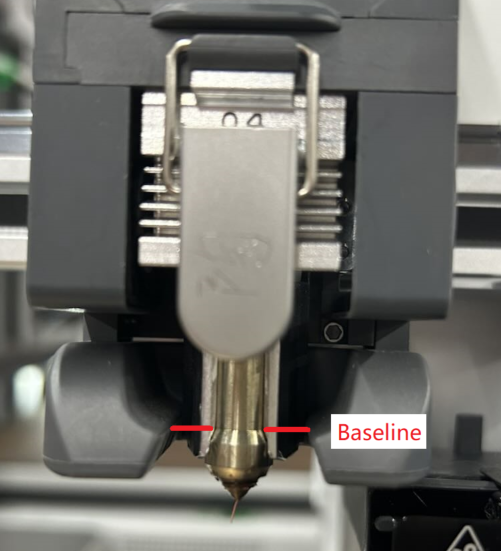
After installation, check the hotend alignment from two angles:
- Front view: The heating assembly should fully enclose the nozzle at the bottom of the hotend.
- Side view: The heating assembly and the hotend throat should be vertically aligned.
2. Remove Foreign Objects and Filament Debris
- Check the nozzle tip, the area around the strain gauge, and the nozzle wiping area for residual filament. Remove any buildup that could interfere with movement.
3. Check and Reposition the Nozzle Wiper Module
- Check whether the nozzle wiper module is loose, displaced, or detached.
- If it has detached or is incorrectly positioned, reinstall and secure it. Make sure it is not loose or deformed.
4. Check the Strain Gauge
- Open the toolhead and inspect the strain gauge on the extruder for visible damage, cracks, or severe deformation.
- If it has sustained physical damage, the strain gauge assembly will usually need to be replaced.
¶ General Troubleshooting Steps
Step 1: Switch Off the Printer and Let It Cool
Before any physical inspection, debris removal, or contact with extruder components, switch off the printer and allow the printhead to cool to prevent burns or electrical short circuits.
Step 2: Check for Mechanical Interference
With the power off or the motors released, gently move the extruder by hand. Check whether the X, Y, and Z axes move smoothly without sticking, unusual noises, or physical obstructions.
Step 3: Check the Cables and Connectors
Open the printer housing or inspect the extruder circuit board. Check whether the sensor ribbon cable and connectors are loose or making poor contact. Disconnecting and reconnecting the ribbon cable can usually resolve signal contact problems caused by vibration.
Step 4: Software and Firmware Troubleshooting
Check whether the firmware is up to date. New firmware versions may optimize sensor trigger thresholds or correct detection algorithms. If necessary, restore the printer to factory settings or reflash the firmware.
Step 5: Contact Customer Support
If foreign objects, poor contact, and detached modules have been ruled out, and restarting and calibration do not resolve the issue, the hardware itself (such as a faulty sensor or damaged strain gauge) is likely to be defective. Record a video showing the issue and contact the manufacturer's customer support to request replacement parts.
For i7 replacement instructions, refer to the i7 Bed Leveling Sensor Replacement Guide.
For i8 replacement instructions, refer to the i8 Bed Leveling Sensor Replacement Guide.