¶ 970109: Heatbreak Cooling Fan Error
¶ Applicable Model:
SPARKX i7, i8
¶ Why Did This Message Appear?
- The fan is faulty and cannot spin.
- The fan cable is loose, disconnected, or damaged.
- Foreign objects are blocking the fan and preventing it from reaching the required speed.
- The firmware version is outdated.
- The toolhead board is faulty.
¶ How to Fix It?
1. Heat the nozzle to 60°C. The heatbreak cooling fan starts running when the nozzle temperature exceeds 60°C. Check whether the fan is running.
2. Check the heatbreak cooling fan cable for damage or breakage. If the cable is undamaged, disconnect and reconnect it.
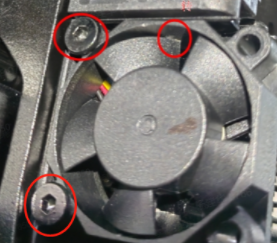
3. If the fan is running, check whether any foreign objects are touching the fan blades or causing unusual noise. Remove any foreign objects found. If there are none, loosen the fan mounting screws by half a turn and try again. Overtightened screws may prevent the fan from reaching the required speed.
4. Make sure the printer is running the latest firmware to rule out software issues in older versions. On the printer, go to Settings > System > Firmware Update to check for and install firmware updates.
5. If the issue persists after completing the steps above, contact customer support for assistance.
6. For instructions on replacing the hotend cooling fan, refer to the i7 Hotend Cooling Fan Replacement Guide, i8 Hotend Cooling Fan Replacement Guide.