¶ Spool Compatibility
The i8 spool holder accommodates common 1 kg filament spools with the following specifications:
- Creality spools: Compatible options include Hyper cardboard spools, Hyper plastic spools, CR plastic spools, and EN PLA+ cardboard spools.
- Third-party spools: Supported brands listed in the source include LANBO, SUNLU, and eSUN.
- Spool dimensions:
| Dimension | Requirement |
| Center hole diameter | ≥ 32 mm |
| Spool width | ≤ 70 mm |
| Outer diameter | ≤ 220 mm |
If you use the i8 with CFS Lite, also refer to the CFS Lite Filament Compatibility Guide.
¶ Filament Compatibility
| Filament | Compatibility | Notes |
| PLA | Supported | Standard PLA and PLA variants, including PLA Silk, PLA Matte, and PLA-CF. |
| PETG | Supported | Standard PETG and PETG variants, including PETG-CF. |
| TPU | Not supported | TPU and other flexible filaments are not currently supported. |
| ABS / ASA | Not recommended | Engineering filaments are not recommended for this open-frame printer. |
| Support for PLA | Supported | Support filament for PLA. |
Although the i8's nozzle and heated bed temperature ranges can accommodate many filaments, temperature capability alone does not determine material compatibility. With its QuarTeks™ toolhead and open-frame design, the i8 is recommended primarily for commonly used multicolor printing materials such as PLA and PETG. Examples include Creality Hyper PLA, Creality Hyper PETG, and standard PLA and PETG from other manufacturers. The i8 also supports decorative and lightly reinforced materials derived from PLA and PETG, such as PLA-CF, PLA Silk, PLA Matte, and PETG-CF.
TPU and other flexible filaments are not currently suitable for the i8. They can compress, bend, or jam in its four-channel feeding mechanism, making reliable feeding difficult.We are testing higher-hardness TPU grades and other specialty filaments for flexible printing. Any changes will be announced in official compatibility updates.
We do not recommend printing ABS or ASA on the i8. Its open-frame design does not maintain a warm enclosed printing environment, increasing the risk of warping and cracking with these materials. Other high-temperature materials listed as not recommended include PC, PA, PA-CF/GF, PET-CF/GF, and PPA-CF/GF.
Printing ABS and ASA may also produce harmful emissions and irritating odors, requiring suitable ventilation and filtration. On an open-frame printer, emissions are released directly into the surrounding air.
¶ Multi-Material Printing
The i8 does not currently support combining materials with substantially different printing temperatures in the same print job, such as PLA and PETG. Differences in their printing requirements may affect filament switching and print quality and increase the risk of clogging.
Materials with similar printing temperatures and flow characteristics are better suited to use together. For example, standard PLA and silk PLA can be used in the same model.
For support printing with a different material, use a dedicated support filament for PLA with compatible temperature requirements. See the Easy-Removal Support Printing Guide for details.
¶ Filament Care and Nozzle Settings
- Drying: Because the i8 uses an open spool holder, the source recommends drying all filaments before printing at 50–55 °C for 4–6 hours. Moisture can cause stringing, bubbles, or rough surfaces.
- Storage: Keep unused filament in a sealed bag or dry box to limit moisture absorption during storage.
- Nozzle size: The standard nozzle diameter is 0.4 mm. After changing to a 0.2 mm or 0.6 mm nozzle, update the nozzle diameter in the slicer.
¶ View Compatible Filaments and Add Filament Parameters
The slicer lets you view filament parameters available for the i8 and use preconfigured settings to slice your models.
¶ 1. Select the Printer and Nozzle Size
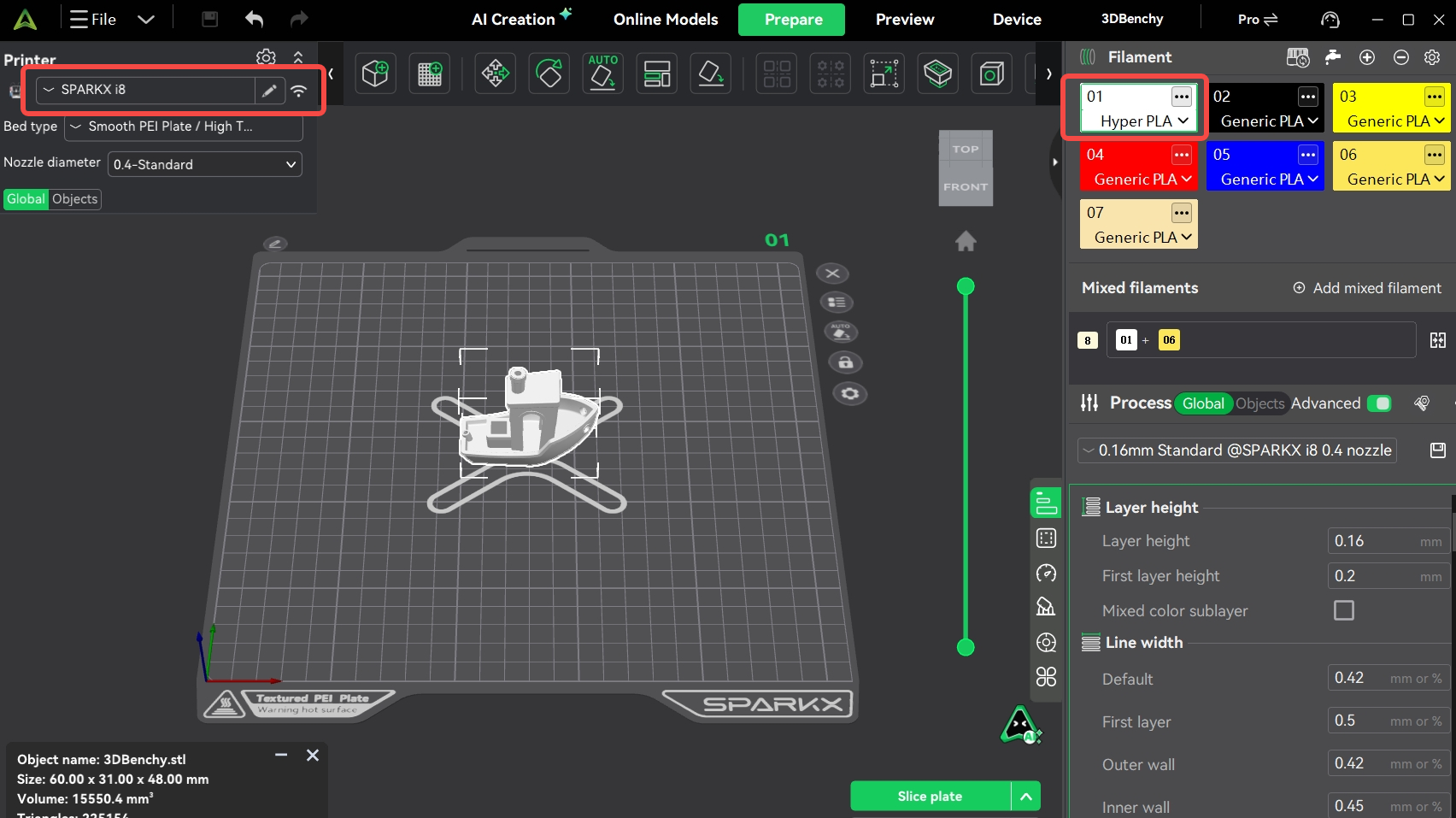
On the Prepare page, select the i8, the correct build plate type, and the nozzle diameter. The default filament selection is Hyper PLA.
¶ 2. Add Filament Type
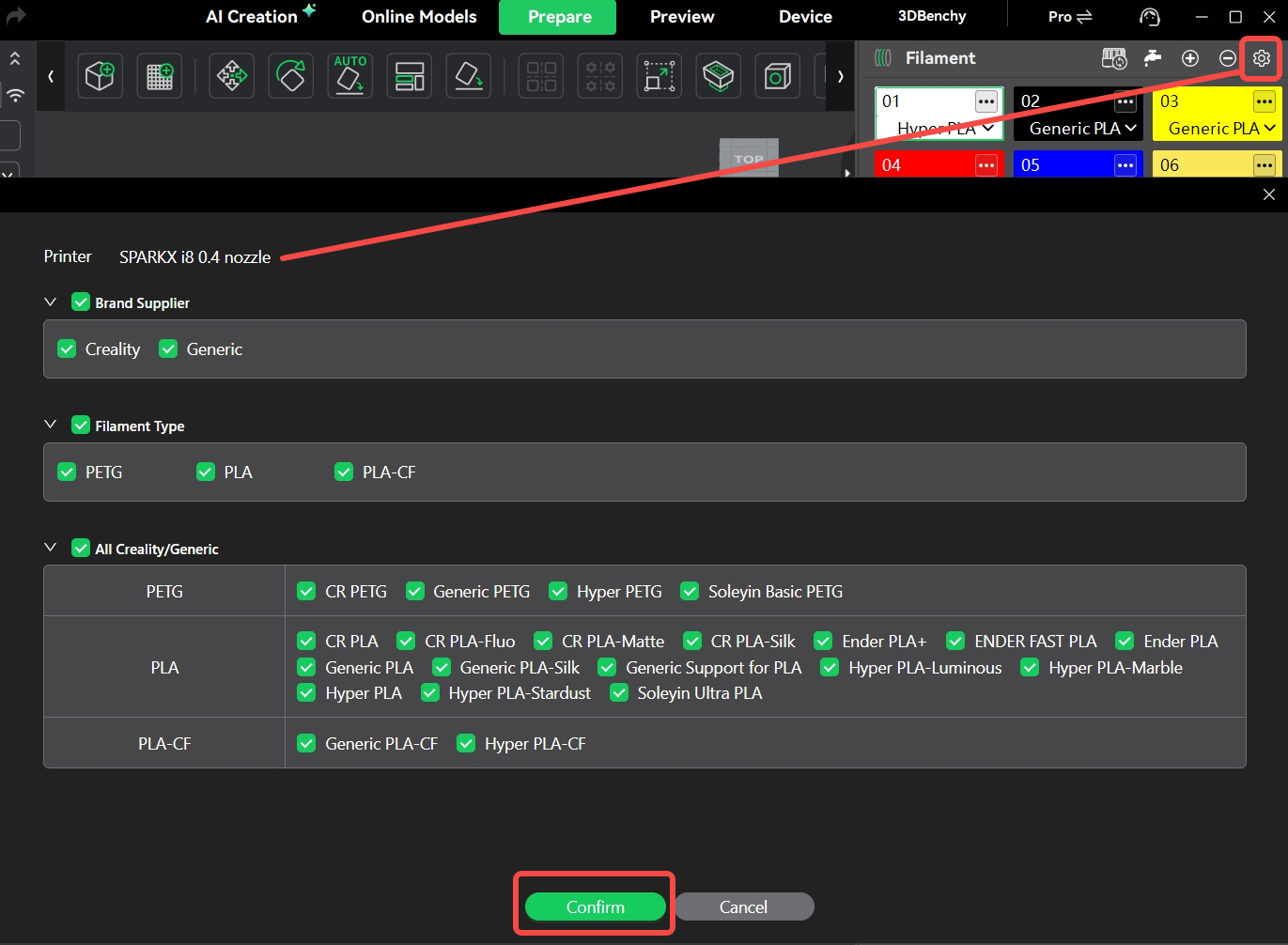
Click the settings icon in the Filament section in the upper-right area of the window. In the filament selection window, select the material types and variants you want to make available, and deselect any you do not need.
¶ 3. Change Filament Type
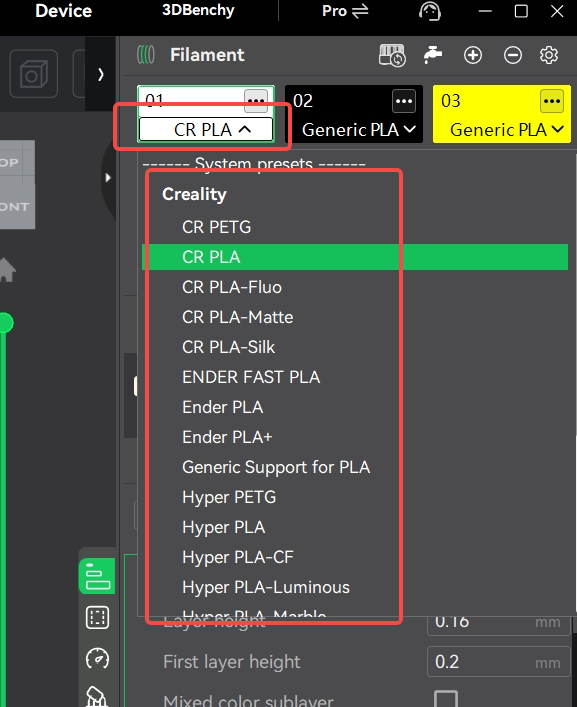
Choose the required type from the filament drop-down menu, then slice and print your model. The slicer applies the temperature, speed, and other settings stored in the selected parameter.