¶ SPARKX i7 – Firmware 1.1.5.10 (20260918)
¶ Key Updates
1.Reduced occasional first-layer squishing and stringing.
2.Addressed some issues related to error codes 2001 and 2060.
3.Updated CFS lite to V0.5.4.
¶ SPARKX i7 – Firmware 1.1.5.8 (20260811)
¶ Key Updates
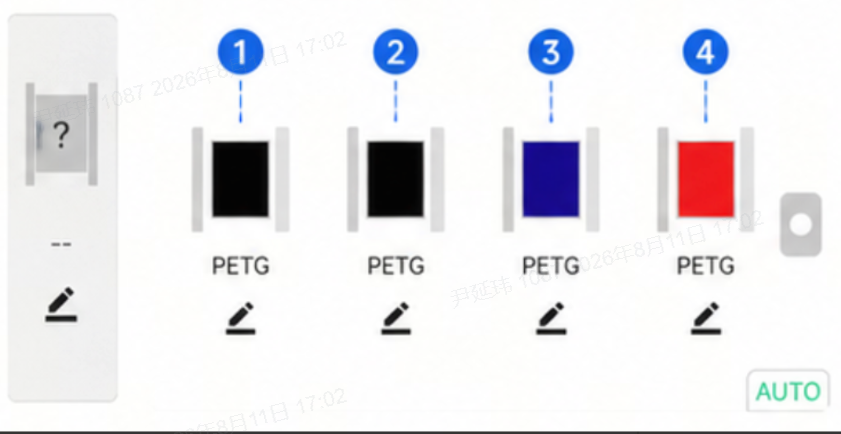
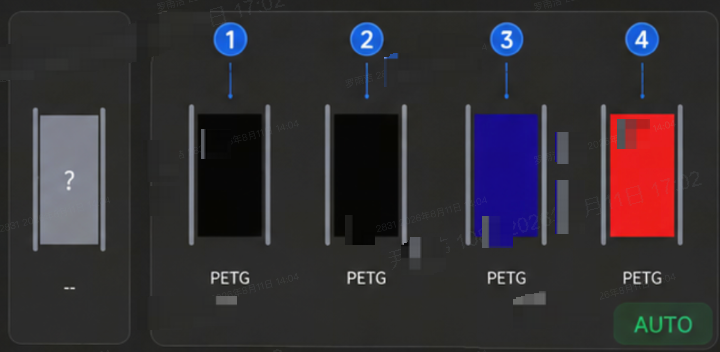
Optimized the CFS nano filament page. Filaments are now displayed on the device according to their actual positions on the filament rack, allowing users to easily match them with the physical slots for editing, loading, or unloading. Please install the PTFE tubes correctly according to the user manual to ensure accurate slot mapping.
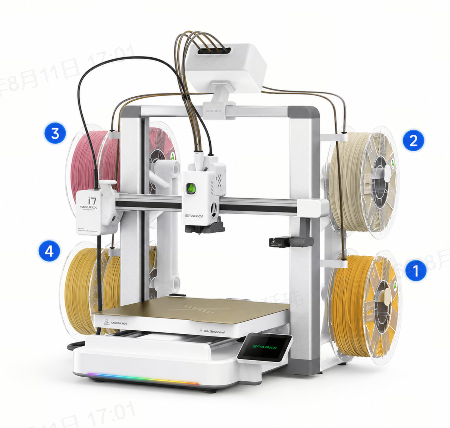
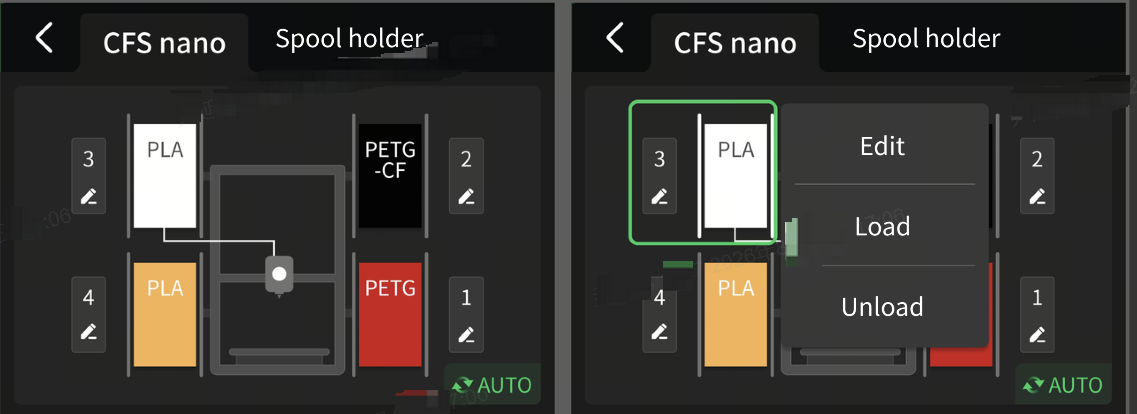
The CFS nano’s physical slot numbers and positions remain unchanged. Previously, the four filament slots in the app/slicer were displayed from left to right as 4, 3, 2, 1. They are now displayed as 1, 2, 3, 4. The app/slicer still uses a horizontal layout; the slots shown from left to right as 1, 2, 3, 4 now correspond directly to the actual physical slots.
 |
 |
¶ SPARKX i7 – Firmware 1.1.5.6 (20260803)
¶ Key Updates
Fixed an issue where error codes 2060 / 2001 could occur under certain conditions.
Upgraded the CFS nano firmware to V1.5.4 to improve homing stability and fixed a rare issue where homing could fail and the red indicator would light up.
Optimized the CFS nano communication retry and initialization mechanisms to reduce communication timeouts and initialization errors.
Optimized the device connection and recognition process to prevent unnecessary automatic recognition from interfering with operations such as nozzle wiping.
¶ SPARKX i7 – Firmware 1.1.5.4 (20260722)
This update adds support for the CFS Nano, further improves the XS2000 issue, and enhances storage management, network connectivity, and overall printing stability. Updating to the latest version is recommended.
¶ Key Updates
Added support for the CFS Nano.
Further optimized the XS2000 issue by fixing errors caused by tiny line segment processing and BOX communication blocking, improving overall printing stability.
¶ Experience Improvements
Improved the low-storage user experience. When storage is nearly full, you can now free up space with one tap by deleting history files older than 30 days (including local files, timelapse photos, and log files). Printing will also be blocked when there is insufficient storage space to save the print file, preventing failed print jobs.
Enlarged the QR code on the Account page for faster and more reliable scanning.
Updated the Wi-Fi driver to improve network connection stability.
The Pressure Advance (PA) Calibration option is now disabled by default, but can still be enabled manually if needed.
¶ Bug Fixes
Fixed a printing issue that could occur when the flushing temperature exceeded the printer's maximum temperature. If the configured temperature exceeds the limit, the printer will now automatically use the default temperature.
Fixed an issue where Precise Homing could still be incorrectly reported as failed even after the final homing cycle completed successfully.
Fixed an issue where, after restoring factory settings, the filament conflict detection could incorrectly report "External Spool Holder in Use."
Fixed the XS2060 issue that could occur under certain conditions.
¶ SPARKX i7 – Firmware1.1.4.0.4(20260708)
¶ Key Updates
1.Optimized the Z-axis homing retry mechanism to reduce the likelihood of error 2768.
2.Optimized motor operating parameters to improve overall device stability.
¶ SPARKX i7 – Firmware 1.1.4.0.1(20260608)
¶ Key Updates
¶ Improved CFS Lite Connection Stability
Added an automatic reconnection retry mechanism to reduce false disconnections caused by command processing timeouts.
Updated the CFS Lite firmware to V0.5.2, improving communication stability between the device and filament boxes.
Fixed an issue where the filament box could go offline during filament unloading after an empty-print event.
Fixed issues related to the Toolhead 5-Way Connector and filament winding that could cause connection interruptions, improving multi-color printing stability.
¶ Optimized Filament Remaining Display and Read/Write Logic
Optimized the filament remaining read/write strategy to perform read/write operations only on supported filaments.
Fixed an issue where non-RFID filaments could incorrectly display the remaining amount from the previously used RFID filament.
Optimized the refresh frequency of filament remaining data for more accurate and responsive updates.
Fixed an issue where encrypted mainboards could not recognize legacy RFID filament tags.
¶ Fixed Printing and Filament Change Issues
Fixed an issue where the nozzle temperature for PETG would incorrectly drop to 220°C during filament changes.
Fixed an issue where an abnormal return-to-feed state of the CFS Lite could incorrectly trigger a print pause.
Fixed an issue where filament unloading after an empty-print event could cause the filament box to go offline, reducing the risk of print interruptions.
¶ Fixed Device Status and Temperature Control Issues
Fixed an issue where the printer could still report "Not Homed" after repeated homing operations.
Fixed abnormal automatic cooldown behavior caused by the idle temperature setting, preventing related errors.
Fixed an issue with incorrect storage space reporting.
Fixed an issue where the download status was displayed incorrectly on the printer screen when using WAN send-only mode.
¶ Improved System Stability
Fixed a memory leak that could be caused by the extruder cooling fan after multiple print jobs.
Reduced the frequency of debug log output to lower system overhead.
Optimized underlying system logic to improve stability during long-duration and repeated printing sessions.
¶ SPARKX i7 – Firmware 1.1.2.9(20260518)
¶ Key Updates
The system now supports the following additional languages: Arabic, Traditional Chinese, Polish, Vietnamese, Indonesian, Thai, Malay, Hebrew, and Afrikaans.
CFS lite firmware updated to version 0.4.9 Added filament remaining tracking support: CFS lite now supports RFID filament remaining detection, real-time material usage deduction during printing, and automatic remaining amount refresh.
New Filament Color Palette & CFS lite Color Selection
More color options Optimized the color palette with additional commonly used colors and improved color sorting display.
Deep CFS lite integration Added dedicated CFS filament color selection support.
Custom color synchronization Supports displaying custom filament colors configured in the slicer software.
¶ Printing & Workflow Optimizations
Nozzle wiping logic optimization Improved the Nozzle Wiping motion path to: lift first → move horizontally → press down Effectively reducing the risk of the nozzle colliding with the Print Plate.
More reliable Power Loss Recovery
Fixed an issue where purge operations could occasionally be skipped before resuming after tangled filament recovery, preventing missing extrusion at the resume point
Fixed incorrect filament color output caused by abnormal filament box feeding during power-loss recovery
Simplified interaction experience
Calibration reminder pop-ups are no longer forced after updates, reducing unnecessary interruptions
Added a QR code to the firmware update page for quick access to the full update manual via mobile phone
Print start status is now synchronized with the mobile app in real time
¶ Fixes & Improvements
Printing Stability
Added delayed shutdown for the Extruder Cooling Fan after printing to improve the success rate of the next filament loading process
Fixed XS2000 / XS2001 errors caused by excessive system load from native Klipper code triggering master-server reconnection due to heartbeat timeout
Disabled Heated Bed leveling compensation fade-out to improve outer wall and top surface print quality
Fixed parsing failures when filenames contained apostrophes (')
System & Network
UI page reconstruction Optimized several system pages to improve touchscreen responsiveness and overall smoothness
WLAN optimization
Fixed delayed SSID scanning
Fixed abnormal IP address display issues
Notification indicator fix Fixed the issue where red notification dots on the Assistant page could not be cleared
Hardware Protection & Error Handling
Collision protection Fixed a safety issue where entering out-of-range values through external controllers (such as Fluidd) could cause the Z-axis to collide with the gantry without triggering an error
Error guidance update Some error-code QR codes now redirect to the latest SparkX Wiki knowledge base for faster troubleshooting
Calibration fixes
Fixed unexpected shutdowns caused by abnormal cutter calibration
Fixed upgrade pop-ups appearing unexpectedly during manual calibration
Printing Details
Fixed occasional unloading failures on the filament loading/unloading page
Optimized purge temperature accuracy during the print preparation stage
Improved the post-print feedback feature.
¶ SPASPARKX i7 – Firmware 1.1.2.9(20260518)
¶ Key Updates
The system now supports the following additional languages: Arabic, Traditional Chinese, Polish, Vietnamese, Indonesian, Thai, Malay, Hebrew, and Afrikaans.
CFS lite firmware updated to version 0.4.9 Added filament remaining tracking support: CFS lite now supports RFID filament remaining detection, real-time material usage deduction during printing, and automatic remaining amount refresh.
New Filament Color Palette & CFS lite Color Selection
More color options Optimized the color palette with additional commonly used colors and improved color sorting display.
Deep CFS lite integration Added dedicated CFS filament color selection support.
Custom color synchronization Supports displaying custom filament colors configured in the slicer software.
¶ Printing & Workflow Optimizations
Nozzle wiping logic optimization Improved the Nozzle Wiping motion path to: lift first → move horizontally → press down Effectively reducing the risk of the nozzle colliding with the Print Plate.
More reliable Power Loss Recovery
Fixed an issue where purge operations could occasionally be skipped before resuming after tangled filament recovery, preventing missing extrusion at the resume point
Fixed incorrect filament color output caused by abnormal filament box feeding during power-loss recovery
Simplified interaction experience
Calibration reminder pop-ups are no longer forced after updates, reducing unnecessary interruptions
Added a QR code to the firmware update page for quick access to the full update manual via mobile phone
Print start status is now synchronized with the mobile app in real time
¶ Fixes & Improvements
Printing Stability
Added delayed shutdown for the Extruder Cooling Fan after printing to improve the success rate of the next filament loading process
Fixed XS2000 / XS2001 errors caused by excessive system load from native Klipper code triggering master-server reconnection due to heartbeat timeout
Disabled Heated Bed leveling compensation fade-out to improve outer wall and top surface print quality
Fixed parsing failures when filenames contained apostrophes (')
System & Network
UI page reconstruction Optimized several system pages to improve touchscreen responsiveness and overall smoothness
WLAN optimization
Fixed delayed SSID scanning
Fixed abnormal IP address display issues
Notification indicator fix Fixed the issue where red notification dots on the Assistant page could not be cleared
Hardware Protection & Error Handling
Collision protection Fixed a safety issue where entering out-of-range values through external controllers (such as Fluidd) could cause the Z-axis to collide with the gantry without triggering an error
Error guidance update Some error-code QR codes now redirect to the latest SparkX Wiki knowledge base for faster troubleshooting
Calibration fixes
Fixed unexpected shutdowns caused by abnormal cutter calibration
Fixed upgrade pop-ups appearing unexpectedly during manual calibration
Printing Details
Fixed occasional unloading failures on the filament loading/unloading page
Optimized purge temperature accuracy during the print preparation stage
Improved the post-print feedback featureRKX i7 – Firmware 1.1.2.4 (20260408)
¶ Core Additions & Language Support
Expanded multilingual support: Added support for 9 new system languages (German, Spanish, French, Italian, Brazilian Portuguese, Russian, Turkish, Japanese, and Korean).
LED lighting optimization: During printing, all LED effects now display print progress in real time.
Firmware update reminder: Added a new pop-up notification to ensure you are informed of and can install new firmware updates as soon as they become available.
Built-in model updates: Added PTFE tube tool and Scraper handle models to the built-in sliced files.
¶ Print Quality & Hardware Algorithm Optimization
Core algorithm upgrade: Migrated the core library to a C library interface, with重点 optimizations for arc G-code parsing and fixes for surface bump issues on special models.
Smart cutter calibration: Added cutter coordinate detection and calibration logic before printing.
Hardware travel protection: Added X/Y/Z-axis overtravel error reporting; optimized abnormal X/Y homing logic with a retry mechanism to reduce false errors.
Automated detection: Enabled Print plate detection, PA calibration, and spaghetti failure detection by default, while improving spaghetti detection accuracy.
Enhanced nozzle compatibility: Added support for multiple nozzle diameters with automatic maximum print speed limits; fixed heating errors during quick-release nozzle replacement and cases where heating abnormalities did not pause the print.
Performance stability: Optimized the finishing sequence after vibration compensation; improved compatibility for the external camera timelapse module.
Precision workflow handling: Optimized the underlying interface and stability validation for strain gauge related workflows.
¶ CFS lite / CFS mini System Optimization
Interaction logic fixes: Resolved issues where repeatedly reconnecting the CFS lite did not trigger a pop-up, and where Channel 1 could occasionally be skipped during multi-color printing.
Feed status fixes: Fixed issues where the red indicator light remained on after recovery from feeding abnormalities, as well as abnormal persistent red light behavior when connecting the CFS lite.
Component synchronization: Fixed the issue where the lighting status of the CFS lite box and the printer could become unsynchronized.
Power-loss recovery enhancement: Fixed abnormal automatic filament feeding after power-loss recovery when the CFS lite filament was depleted.
Calibration compatibility: Resolved PA calibration failures caused by unmatched filament types when using CFS mini or the Spool Holder.
Multi-color logic correction: Fixed color mismatch issues caused by incorrect output channel selection after multi-color print errors or power-loss recovery.
¶ System Performance & Safety Protection
[Safety] Permission control: Root permission is now disabled by default at startup. When disabled, SSH and Fluidd backend login will be unavailable.
Faster system response: Rebuilt the UI logic for the homepage (idle/printing) and all device initialization guide pages, significantly improving page transition speed and resolving startup lag.
Storage & data stability: Fixed abnormal concurrent file read issues and added a retry mechanism; resolved USB file recognition failures and copy freeze issues.
Cloud & network optimization: Added WAN “Send Only” mode support; fixed cloud slicing parameter query crashes, custom filament parsing failures, and cloud print triggering issues after failed downloads.
Data table updates: Fully updated the built-in filament data tables.
¶ Interaction Experience & UI Fixes
Visual layout optimization: Enlarged the homepage print preview image; extended toast display duration; fixed incomplete display issues for certain buttons and titles.
Operation habit adjustment: Moved the timelapse switch from the settings page to the file details page before print launch; updated the maintenance QR code in the user assistant page.
Abnormal pop-up fixes: Fixed issues where the “Resume Printing” pop-up would not disappear, as well as abnormal power-loss recovery pop-ups.
Guidance & feedback: Rebuilt the privacy policy page and navigation logic; added non-app QR code redirect support for account login.
Error logic adjustment: Optimized reporting logic for some error codes, converted部分信息 to toast notifications, and updated the error code descriptions.
¶ SPARKX i7 – Firmware 1.1.1.27 (20260311)
¶ Detection & Stability Upgrades
Resolved intermittent stringing: Effectively fixes occasional stringing during printing.
Enhanced AI monitoring stability: Fixed an issue where intermittent AI engine exceptions could prevent spaghetti detection.
Motion sequence optimization: Fixed the error reported after vibration optimization and optimized the cooldown and homing sequence after leveling and self-check.
Build plate protection mechanism: Fixed an issue where the nozzle could scrape the bottom plate under specific conditions.
¶ Printing Logic & Compatibility
Multi-color print mode retention: Fixed an issue where print speed would automatically revert from Ludicrous Mode to Standard Mode after color changes in multi-color printing.
File recognition fix: Resolved issues where folder contents could not be recognized and cloud-sliced files were incorrectly flagged as “Unofficial Source.”
Power-loss recovery enhancement: Fixed system errors triggered when power-loss recovery was activated during filament depletion.
Built-in data update: Updated the built-in filament database and preset G-code files to ensure more accurate print parameters.
¶ Hardware Interaction & Maintenance
Temperature control parameter saving: Fixed an issue where nozzle PID calibration parameters could not be saved, ensuring stable temperature control.
Display driver correction: Optimized the color display logic for certain screen drivers, resolving inverted color issues.
¶ SPARKX i7 – Firmware 1.1.1.23 (20260129)
Firmware Version 1.1.1.23, based on 1.1.1.20
¶ Printing Algorithm & Control Optimization
Arc motion optimization: Improved the G2/G3 command algorithm to reduce system memory usage while improving path smoothness and ensuring long-duration print stability.
Mitigated XS2000 errors: By adjusting motor driver microstepping, effectively suppresses resonance at specific frequencies and improves motion system reliability.
Extrusion speed limit: Introduced a maximum speed limit for E-axis movement, retraction, and infill phases to ensure safe power operation of the extrusion system at high speeds.
¶ Feeding & Unloading Reliability Improvements
Optimized cut-and-unload action: Improved the unload sequence before cutting to prevent failures caused by heat-softened filament deformation.
Fixed feed retry logic: Fixed an issue where retrying after a feeding abnormality could cause the device to go offline, improving recovery success rates.
Fixed unload error logic: Resolved a system error that could be triggered by manual retry during unloading abnormalities.
¶ Safety & Interaction Fixes
Target temperature limit: Added a target temperature threshold limit function to comprehensively improve heating safety.
Strain gauge status interception: Added strain gauge damage detection during print preparation. If an abnormality is detected, the process will automatically pause.
Fixed WAN printing: Fixed an issue where print jobs could not be started properly in cloud environments, ensuring smooth remote scheduling.
Fixed display abnormality: Resolved occasional screen corruption on the home page when starting a print task.