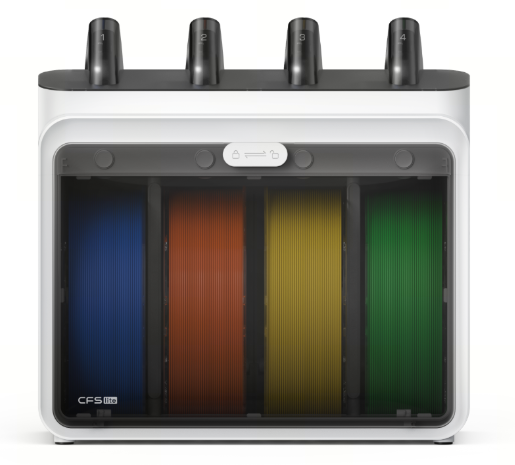
¶ CFS Lite Usage
¶ What is the difference between CFS Lite and CFS mini?
CFS lite is an automatic filament management system that supports multi-color printing. It enables functions such as multi-color printing, automatic filament loading and unloading, and automatic filament resupply, helping you complete various printing tasks with minimal manual intervention.
CFS mini is a basic automatic filament management system. It also supports automatic loading and unloading, as well as automatic filament resupply. When a spool runs out, it can automatically switch to the next spool to prevent print failures caused by filament runout.
In addition, it can drive 3 kg large spools and provide automatic feeding capability for dry boxes without active feeding mechanisms. For leftover filament spools that are nearly empty but not yet discarded, CFS mini can also continue printing through automatic filament resupply.
However, compared with CFS lite, CFS mini does not support multi-color printing and does not have an enclosed filament storage compartment.
¶ Which printer models does CFS Lite support?
CFS Lite currently supports SPARKX i7 only. Support for additional models may be expanded in the future based on user demand.
¶ How many CFS Lite units can be connected to one printer?
An i7 printer supports a maximum of one CFS Lite.
¶ How should the PTFE tubes be routed when used with i7?
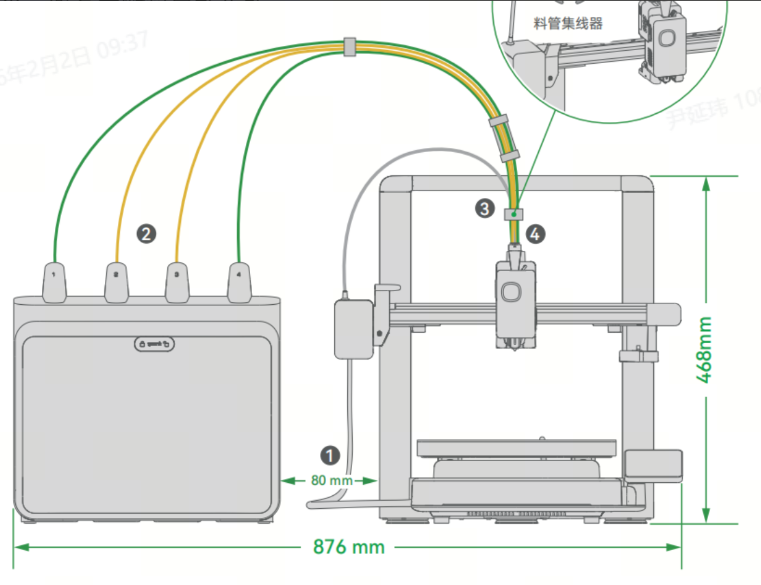
1. All four PTFE tubes have a length of 98 cm.
2. The recommended distance between the i7 and CFS lite is 8 cm (measured from the gantry or 2 cm from the leftmost position of the X-axis), as shown in the figure.
If the CFS lite is placed too far away, filament loading and unloading resistance will increase, and feeding resistance will also increase when printing on the right side of the build area.
3. To reduce resistance, three different hubs are designed to help guide and align the PTFE tubes. Please install the hubs as shown in the figure:
1. 4-port Hub (Short): Install near the center position.
2. 4-port Hub (Long): Pre-installed at the factory, approximately 8 cm from one end of the PTFE tubes.
3. 5-port Hub: Install between the i7 Toolhead Filament Hub and the 4-port Hub (Long). When installing, position it closer to the 4-port Hub (Long).
The larger opening should face the rear of the i7 to allow the toolhead cable to be secured.
¶ What is the recommended PTFE tube length when used with i7?
When used with the i7 printer, the recommended length for all four PTFE tubes is 98 cm.
¶ Are there any filament requirements when using CFS Lite?
Please avoid using CFS lite to print flexible materials, including TPU (see details below), TPE, or moisture-sensitive water-soluble filaments such as PVA. Also avoid using materials that are too hard (high modulus) or too brittle (low toughness).
¶ Is CFS Lite compatible with carbon-fiber (CF) filaments?
Creality PLA-CF and Creality PETG-CF are compatible with CFS Lite. However, some reinforced filaments from other brands (such as -CF or -GF) may be too brittle, too hard, or too rough. These filaments may break inside the feeding path or cause wear to the feeding channels, and are therefore not recommended.
¶ Can CFS Lite be used with K2 series, Hi series, or other Creality printers?
No. Currently, CFS lite only supports the i7 series printers.
¶ What is the space requirement for CFS Lite?
362×227×364mm³。
¶ CFS Lite Specifications
¶ What spool sizes are supported by CFS Lite?
- Spool outer diameter: 197–202 mm
- Spool width: 42–68 mm
¶ CFS Lite Features
¶ Does CFS Lite support automatic filament resupply?
Yes. When filament runs out, CFS Lite will automatically switch to another spool with identical properties to continue printing.