¶ New Features
¶ Optimized Prime Tower Planning for Time-Based Pre-Purging
On SPARK i8, where four filament channels share a common heating system, filament in an idle channel may become less viscous after prolonged heating.
Creality Print now estimates the additional purging required for the incoming filament during a color change and combines it with the existing filament-change purge into a single Prime Tower operation.
This optimization helps prevent unnecessary Prime Tower enlargement caused by adding the two purge volumes together.
¶ Purge Volume Calculation
The incoming filament refers to the filament channel being switched to. The time threshold, maximum purge volume, and minimum purge volume are all taken from the incoming filament's settings. Idle time is based on the print time estimated by the slicer.
Time Factor
Time Factor = min(Idle Time / Configured Time Threshold, 1)
Time-Based Purge Volume
Time-Based Purge Volume = Minimum Purge Volume + (Effective Maximum Purge Volume - Minimum Purge Volume) × Time Factor
Actual Prime Tower Purge Volume
Actual Prime Tower Purge Volume = max(Time-Based Purge Volume, Filament-Change Purge Volume Allocated to the Prime Tower)
If a scheduled time-based purge has already been performed since the incoming filament was last used, the time factor is reset to 0.
If the configured maximum purge volume is greater than 0 but lower than the minimum purge volume, the minimum purge volume is used as the effective maximum.
Setting either the time threshold or maximum purge volume to 0 disables time-based pre-purging for that filament.
¶ Calculation Example
The following example uses a minimum purge volume of 25 mm³, a time threshold of 20 minutes, and a maximum purge volume of 72 mm³. The filament-change purge volume allocated to the Prime Tower is 60 mm³.
<!--br {mso-data-placement:same-cell;}--> td {white-space:nowrap;border:0.5pt solid #dee0e3;font-size:10pt;font-style:normal;font-weight:normal;vertical-align:middle;word-break:normal;word-wrap:normal;}
Incoming Filament Status |
Time Factor |
Time-Based Purge Volume (mm³) |
Actual Prime Tower Purge Volume (mm³) |
Idle for 10 minutes |
0.5 |
48.5 |
60 |
Idle for 13 minutes |
0.65 |
55.55 |
60 |
Idle for 18 minutes |
0.9 |
67.3 |
67.3 |
Idle for 20 minutes |
1 |
72 |
72 |
Scheduled purge already performed |
0 |
25 |
60 |
The 20-minute threshold represents the idle duration at which the time-based purge volume reaches its configured maximum. For shorter idle periods, the purge volume is calculated proportionally.
When the entire filament-change purge volume is allocated to the Prime Tower, the comparison uses the purge matrix value for the transition from the outgoing filament to the incoming filament, multiplied by the purge volume multiplier.
For example, suppose printing starts with Channel 1, and the model switches to Channels 2, 3, and 4 sequentially at 20-minute intervals. If no scheduled purge has been performed before each channel is activated, the time-based purge volume for each incoming channel reaches 72 mm³.
If a scheduled purge is configured at 60-minute intervals and is executed before the Prime Tower purge associated with switching to Channel 4, the time-based purge volume for Channel 4 resets to its minimum purge volume. The actual Prime Tower purge volume is then determined by taking the larger of this minimum volume and the filament-change purge volume allocated to the tower.
¶ Added Rounded Outer Corners for the Prime Tower
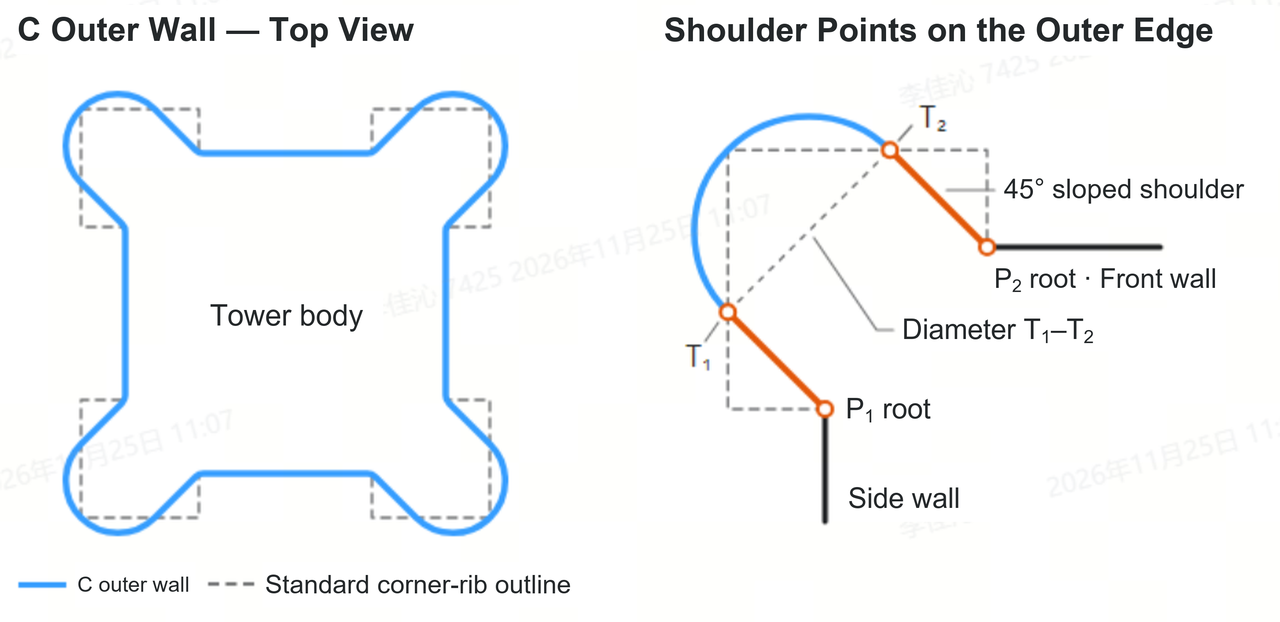
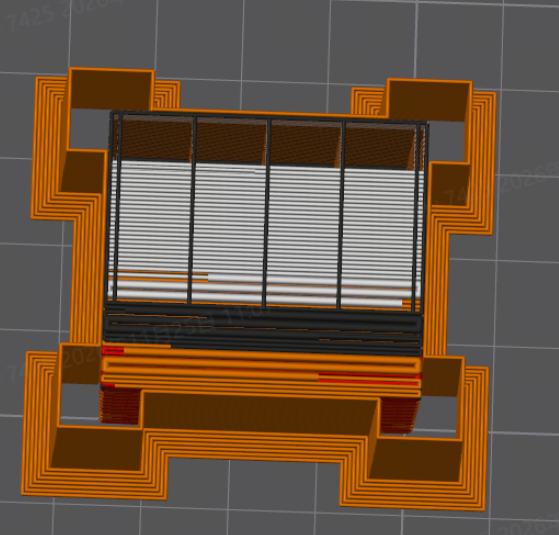
The previous Corner Ribs Prime Tower design featured numerous sharp corners, resulting in frequent acceleration and deceleration during printing. On certain printer models, this could negatively affect extrusion pressure stability during wiping operations.
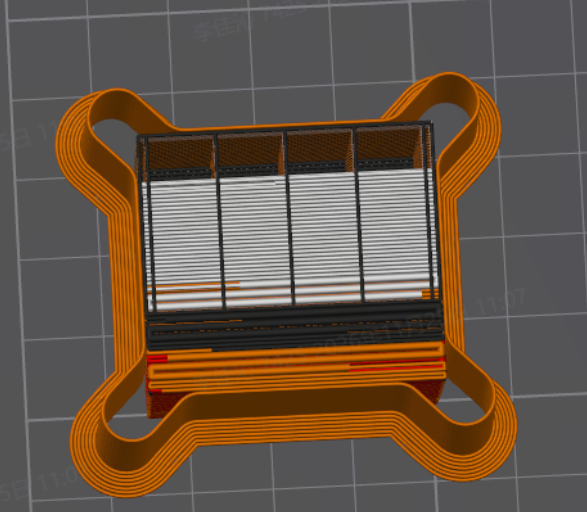
A new Rounded Outer Corners design has been introduced for the Prime Tower, replacing sharp transitions with smoother curved toolpaths.
This improvement helps reduce abrupt motion changes and maintain more stable extrusion during Prime Tower printing.
 |
 |
¶ Fixes
- Improved the Online Presets page to display only preset packages associated with printers that have been added.
- Fixed an issue where the nozzle returned to the model without a Z-hop after a filament change, causing residual filament color to be dragged across the printed surface.
- Improved Split to Objects to preserve the original Z-axis positions of floating parts.
- Fixed a synchronization issue between the timelapse toggle on the Send page and the corresponding setting on the printer.
- Fixed an issue where the action button next to a custom process preset disappeared after loading a model.