¶ New Features
¶ 1. Proactive, Context-Aware Assistance in the AI Edition
The AI Assistant now provides proactive, context-aware assistance to help users understand settings, get recommendations, and resolve issues more efficiently.
Non-default setting detection and explanations: When users open a 3MF file containing non-default settings, Creality Print now displays a notification about the changes. The AI Assistant can explain what the modified settings mean and how they may affect printing.
AI-powered support recommendations: Added an entry point for recommendations on commonly used support settings. Users can ask the AI Assistant for recommendations tailored to their model to help configure supports.
Slicing error assistance: When an error code occurs during slicing, the AI Assistant proactively offers help and automatically includes the error code and relevant context to help users understand the cause and find a solution.
¶ 2. No Wipe Tower Mode for SPARK i8
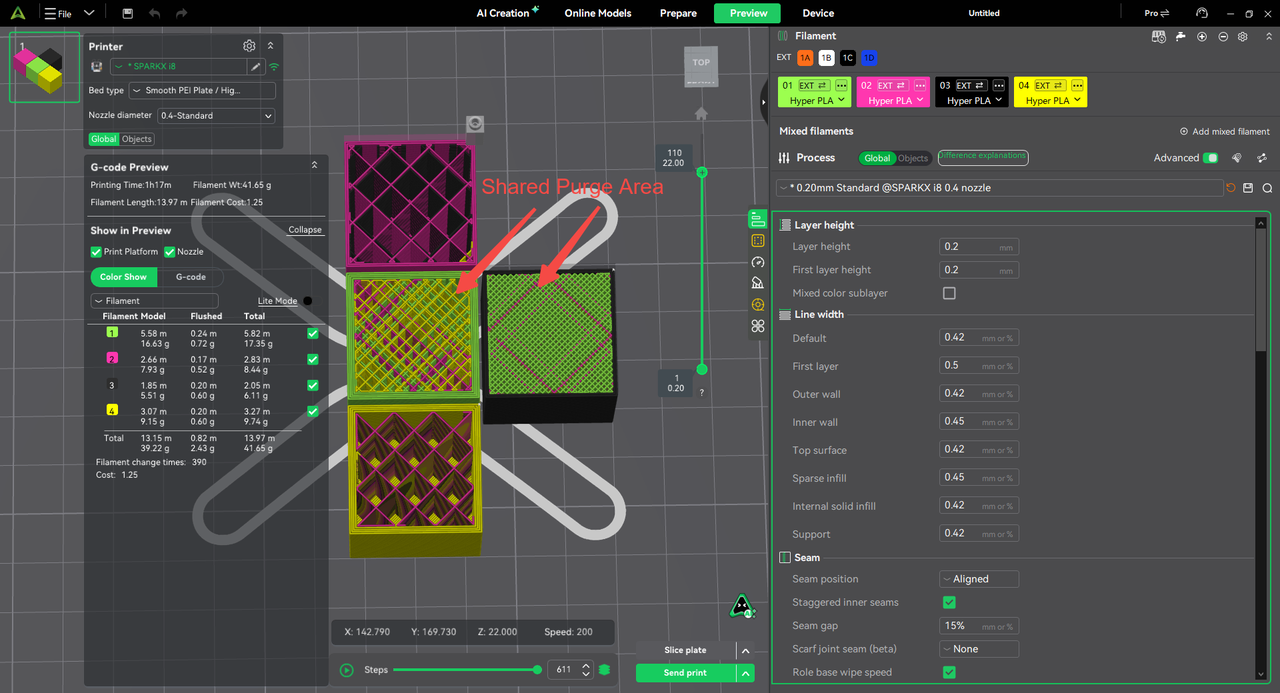
In this mode, the printer prioritizes the model’s infill and inner-wall toolpaths for purging during color changes. After switching colors, it first extrudes the new filament along these internal paths to gradually remove residual filament of the previous color from the nozzle and stabilize extrusion before printing areas where surface appearance matters.
This reduces reliance on a dedicated wipe tower and helps reduce waste from color changes.
If the model does not provide enough internal toolpaths for purging, some purging outside the model may still be required. Results depend on the model’s structure and the difference between the outgoing and incoming filament colors.
¶ Fixes
- Fixed error XD0114 when starting a print over a WAN connection.
- Fixed a conflict between Arc Fitting and Smooth Speed Discontinuity Area (Experimental).
- Re-enabled automatic mapping for K3.
- Added the option to enable timelapse for K3 from the Send page.
- Improved the sign-in flow for users installing Creality Print for the first time.
- Fixed slicing errors affecting certain models.
- Improved the button labels in the dialog shown when exporting G-code with floating objects.
- Improved the estimated completion time display on the device details page.
- Fixed incorrect color-change coordinates for CFS-C.
- Restored thumbnail previews for .stl and .3mf files.
- Fixed an issue where sliced models briefly flashed incorrect colors after enabling options in the Preview view.
- Fixed an issue where models using color-mixing filaments were displayed incorrectly after slicing.
- Fixed an issue where paint-on supports did not take effect in certain areas of a model.
- Fixed an issue where editing a system filament preset incorrectly opened the User Filaments page.
- Fixed excessively long slicing times for models with many holes when the top surface pattern was set to Hilbert Curve.
- Fixed an issue where the selection marquee remained visible after dragging with the left mouse button in the Measure tool.