¶ Falcon A1 Online Connection Failure / Unable to Connect to Engraving Machine Software Operation Guide
Falcon A1 (Standard Edition, no screen): Supports only wired USB connection, no WiFi;
A1 Pro/A1C supports wireless WiFi and USB wired connection
¶ Description of Connection Failure:
Falcon A1 Online Failure / Unable to Connect to Engraver Software (Official: Falcon Design Space (abbreviated as FDS), Third-party: LightBurn Engraver Software (abbreviated as LB), LaserGRBL (abbreviated as GRBL))
¶ Analysis of causes:
- Wiring Method
- Physical port (motherboard side, data cable side)
- Serial Port Driver & System Recognition Failures (Primarily on Windows)
- Software conflicts and permission interception issues
- Firmware & Software Version Mismatch
¶ Troubleshooting and Solutions:
1.Wiring Method
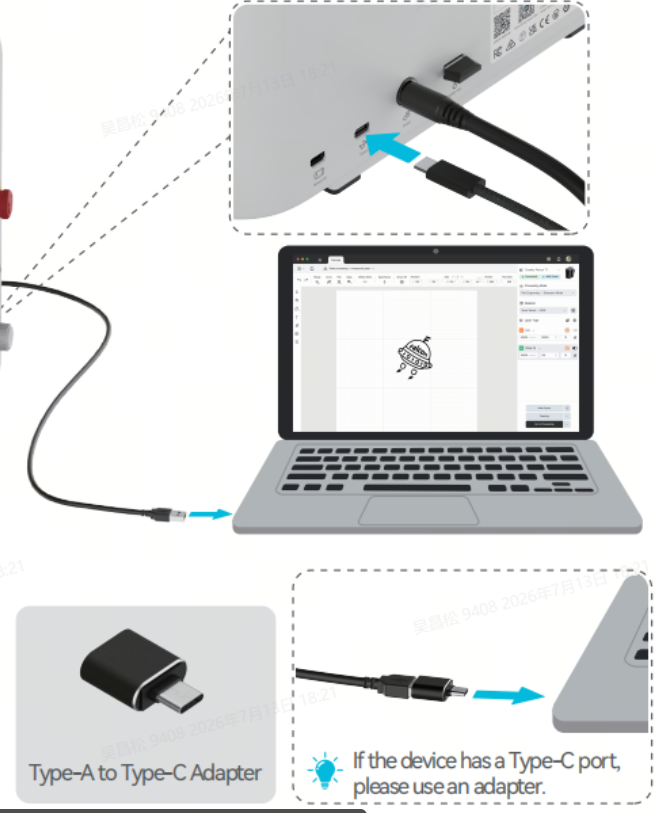
- Power on the device, and it will normally emit two beep sounds. After the standby indicator stays on steadily, connect the original standard data cable that comes with the device.
- USB hubs and docking stations are not recommended.
- For desktop computers, plug into the native USB-A port on the rear of the case; for laptops, prioritize the USB ports on the side of the body and avoid the charging port.
- Note: For computers with all-C ports, an active A-C adapter is mandatory. Plug the C-end of the adapter into the device, and the A-end into the computer's C-port. Do NOT plug the A-C adapter into the device's port.
2.Software conflicts and permission interception issues
Use Task Manager to end all laser-related processes: Falcon Design Space, LightBurn, and LaserGRBL; unplug and replug the USB cable, then only launch Falcon Design Space and try to connect again.
Note: Do not run multiple software programs simultaneously to avoid occupying device ports.
3.Serial port driver & system recognition failure (mainly on Windows), it is recommended to update unknown drivers or reinstall the driver program.
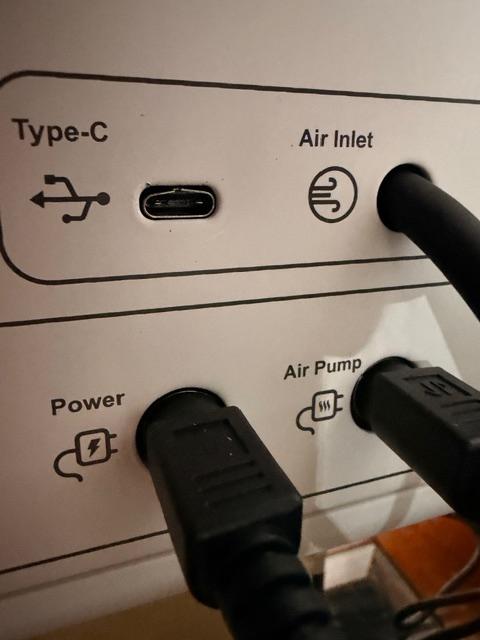
Physical port (motherboard side, data cable side)
4.Check whether the device's Type-C port is damaged.
.jpg)
If using a third-party data cable, please ensure that the Type-C cable is 1.5~2 meters in length, with a transmission rate of over 10Gbps, and supports data transfer from the mobile phone to the PC.
5.Firmware & software version mismatch, please confirm that the firmware and software are the latest versions