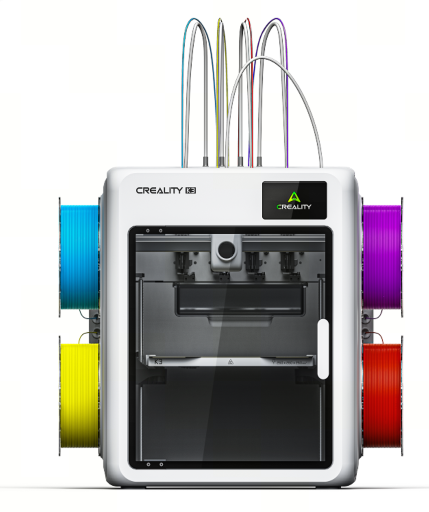
¶ Product Positioning and Selection
¶ 1.1 What kind of 3D printer is the K3?
The K3 is a high-speed multi-color/multi-material FDM 3D printer featuring KliTek™ multi-nozzle tool-changing technology.
The machine is equipped with 4 independent nozzles that can automatically switch between nozzles as needed during printing. Different colors or materials can be printed using separate dedicated nozzles, reducing the waiting time and filament waste caused by frequent filament loading and unloading in traditional single-nozzle multi-color printing.
The K3 has a maximum build volume of 260 × 260 × 260 mm, a maximum print speed of 500 mm/s, and a maximum acceleration of 20,000 mm/s².
¶ 1.2 What is the difference between the K3 and an ordinary single-nozzle 3D printer?
The biggest difference is that the K3 is equipped with 4 independently switchable nozzles.
When an ordinary single-nozzle printer performs multi-color or multi-material printing, it typically needs to continuously retract the current filament and then feed another filament into the nozzle.
The K3 allows different filaments to be pre-loaded in different nozzles. When a color or material change is needed, it simply switches to the corresponding nozzle without having to complete the entire filament loading and unloading process each time.
¶ 1.3 Who is the K3 suitable for?
The K3 is better suited for the following use cases:
Frequent multi-color model printing;
Reducing filament change waiting time and filament waste in multi-color printing;
Needing to use multiple materials to complete a single model;
Makers, studios, and professional users with high requirements for printing efficiency and automation.
¶ 1.4 Is the K3 a four-color printer?
The K3 is equipped with 4 independent nozzles and can use up to 4 nozzles in a single print job.
Each nozzle can be loaded with a different color or type of filament, so it can be used for four-color printing as well as multi-material printing depending on model requirements.
¶ 1.5 Is the K3 only capable of multi-color printing?
No.
In addition to multi-color printing, the K3's four-nozzle system can also be used for:
Single-color printing;
Multi-material printing;
Primary material + support material printing;
Combined printing with different nozzle specifications.
Specific feature support is subject to the software and official release version.
¶ 1.6 Does single-color printing on the K3 require the use of all four nozzles?
No.
For single-color printing, only one nozzle is needed, and the remaining nozzles do not need to participate in the current print job.
KliTek™ Four-Nozzle Tool-Changing System
¶ 2.1 How does the KliTek™ four-nozzle system work?
The K3 is equipped with 4 independent nozzles.
During printing, when the model requires a different color or material, the print head completes the parking of the current nozzle and automatically switches to the target nozzle to continue printing.
Since different filaments remain in their respective nozzles, there is no need to retract filament over a long distance from the hot end and then feed in another filament when changing colors, unlike traditional single-nozzle multi-color systems.
¶ 2.2 Does the K3 print with all four nozzles simultaneously?
No.
The K3 is equipped with 4 nozzles, but during normal printing, only the currently selected nozzle is active while the remaining nozzles are in standby mode.
When a color or material change is required, the system automatically switches to the corresponding nozzle.
¶ 2.3 How many filaments can be loaded on the K3 at the same time?
The K3 can load filament in each of its 4 nozzles independently, so the machine itself can have up to 4 filaments ready for use in a print job at the same time.
¶ 2.4 Does nozzle switching on the K3 require manual operation?
Not during normal printing.
Once slicing is complete, nozzle switching during the print job is performed automatically by the machine, without requiring the user to manually pause printing and change nozzles.
¶ 2.5 Does nozzle switching on the K3 require filament reloading?
Not under normal circumstances.
Since different filaments remain inside their respective nozzles, switching colors or materials primarily involves a nozzle change rather than the full filament retraction and reloading process found in traditional single-nozzle systems.
This is also one of the key reasons for the K3's improved multi-color printing efficiency.
¶ 2.6 Are the four nozzles completely independent?
The four nozzles each have independent filament paths and hot ends, and can be loaded with different colors or types of filament separately.
Therefore, unlike single-nozzle material-change solutions, different materials do not share the same melt chamber for material switching.
¶ 2.7 Can the four nozzles be set to different temperatures?
Yes.
Different nozzles can have their printing temperatures set according to the filament loaded in each one.
This allows each nozzle to be matched to the temperature required by its respective material when printing with different materials.
¶ 2.8 Can the four nozzles use different nozzle sizes?
Yes. The K3 will support installing different nozzle sizes on the four nozzles, with combinations used according to printing requirements.
For example, a smaller-diameter nozzle can be used for fine detail areas, while a larger-diameter nozzle handles infill or large surface areas, improving printing efficiency while maintaining detail quality.
This feature is not yet available in the current version. We are accelerating slicing software and firmware compatibility, and support will be provided through future version updates.
¶ 2.9 If one nozzle becomes clogged, will it affect the other nozzles?
Different nozzles have independent hot ends and filament paths, so a clog in one nozzle will not directly cause the other nozzles to clog simultaneously.
However, if the current print job requires the use of the nozzle experiencing an issue, the machine will still need to follow the exception handling procedure before printing of the corresponding section can continue.
¶ 2.10 Can the K3 be expanded to 5 or more nozzles?
The K3 comes standard with 4 nozzles and does not currently support expansion to additional nozzles.
Multi-Color Printing and Materials
¶ 3.1 Does K3 multi-color printing require a flush tower?
The K3 does not rely on a single nozzle repeatedly switching between different colored filaments, so it can significantly reduce the flushing required in traditional multi-color printing to clear residual color from inside the nozzle.
However, whether a specific model requires auxiliary structures, and the size of those structures, will vary depending on the model, materials, and slicing strategy.
¶ 3.2 Does K3 multi-color printing generate waste material?
Compared to single-nozzle multi-color solutions that require frequent filament retraction, loading, and nozzle flushing, the K3 can reduce filament waste during color changes.
The actual amount of waste generated still depends on the model, number of colors, slicing strategy, and print settings.
¶ 3.3 Can the K3 print more than four colors?
The K3 itself provides 4 nozzles simultaneously, so it can directly use up to 4 filaments in a single run without changing filament.
If the model requires more colors, filaments can be changed according to the actual printing plan.
¶ 3.4 Can the K3 print the same model using different materials?
Yes.
Since each nozzle has an independent hot end, the K3 is well-suited for loading different materials into different nozzles for printing.
For example, model material and support material can be placed in separate nozzles.
Different material combinations still require consideration of factors such as inter-material adhesion, printing temperature, and bed temperature.
¶ 3.5 What filaments does the K3 support?
Supported without the top cover:
PLA, PETG, PET, PLA-CF/GF, PETG-CF/GF, TPU 95A, PCTG
Additionally supported with the top cover:
ABS, ASA, ASA-CF, PP, PC, PA, PA-CF, PP-CF/GF
Actual print results may also be affected by factors such as filament brand, print parameters, and environment.
¶ 3.6 Can the K3 use soluble support materials?
With the support of compatible filament systems and software, the K3 can print model material and support material through separate independent nozzles.
For example, using materials such as BVOH or PVA as support material can reduce the difficulty of support removal for complex structural models.
Print Performance
¶ 4.1 What is the maximum build volume of the K3?
The maximum build volume of the K3 is:
260 × 260 × 260 mm
¶ 4.2 What is the maximum print speed and maximum acceleration of the K3?
The K3 has a maximum print speed of 500 mm/s and a maximum acceleration of 20,000 mm/s².
The actual print speed will be dynamically adjusted based on factors such as model geometry, filament, nozzle, and print quality settings.
¶ 4.3 Is multi-color printing significantly slower than single-color printing?
Multi-color printing will still incur additional time due to nozzle switching, temperature management, and changes in print paths.
However, since the K3 does not need to perform long-distance filament retraction, reloading, and extensive flushing with each color change, it can reduce some of the color-change waiting time found in traditional single-nozzle multi-color printing.
The final print time depends on the number of color changes in the model and the slicing strategy.
¶ 4.4 Will the four nozzles on the K3 reduce the print space?
No. When using all four nozzles for multi-color printing, the K3 can still utilize the full 260 × 260 × 260 mm build volume, and the printable size will not be reduced due to nozzle switching.
¶ Usage and Maintenance
¶ 5.1 Can the nozzles on the K3 be replaced individually?
Yes. All four nozzles on the K3 support individual replacement. When a single nozzle requires maintenance or replacement, the other nozzles do not need to be replaced at the same time.
¶ 5.2 If one nozzle has a problem, do all four nozzles need to be replaced?
No. Each nozzle can be maintained independently, and replacing a single nozzle does not require replacing the other nozzles at the same time.
¶ 5.3 Do the four nozzles need to be calibrated separately?
The K3 establishes the positional relationship between different nozzles through a nozzle offset calibration function, ensuring that different colors or materials align accurately after nozzle switching.
Users do not need to manually measure the positional offset between nozzles during normal use.
In addition, the nozzle pick-and-place coordinate calibration function can also automatically ensure the accuracy of nozzle coordinates, guaranteeing the success rate of nozzle pick-and-place operations.
¶ 5.4 Is recalibration required after replacing a nozzle?
Yes. After replacing a nozzle, it is recommended that users manually enter the calibration function and perform a nozzle offset calibration to ensure accurate print positioning between different nozzles.
In addition, during the preparation phase before printing begins, the K3 will also automatically perform nozzle offset calibration to further ensure print accuracy after multi-nozzle switching.
¶ 5.5 Is maintaining the four nozzles on the K3 more complicated than on an ordinary printer?
During daily use, nozzle switching and related calibrations are performed automatically by the machine.
Users still primarily maintain filament, nozzles, and the print platform in the same way as with an ordinary FDM printer.
Since the four nozzles are independent of each other, when a single nozzle requires maintenance, it can be addressed on that specific nozzle alone.
¶ 5.6 How much space does the K3 require?
To facilitate normal use of the K3, it is recommended to reserve a space of:
460 mm (L) × 500 mm (W) × 600 mm (H).
¶ 5.7 What print beds does the K3 support?
The K3 comes standard with one double-sided PEI spring steel sheet.