¶ TR3266: Filament unloading exception — the filament may not have been cut. Please troubleshoot and try again.
¶ Applicable model: K3
¶ Why does this prompt appear?
During the filament feeding/unloading process or in other scenarios, the system detects that the filament has not been cut.
¶ How to resolve this?
¶ Check the cutter status
Confirm whether the cutter is jammed, missing, or damaged.
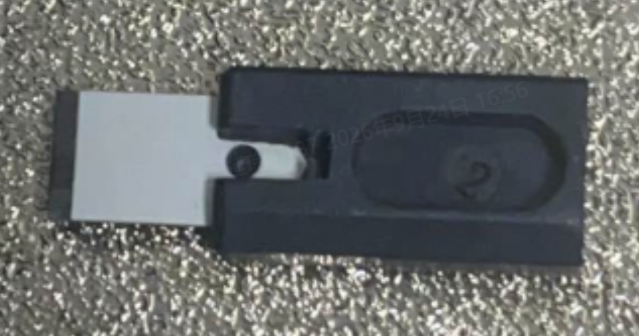
Check whether there are residual filament fragments around the cutter that may be obstructing its movement.
Manually check whether the cutter can spring back normally.
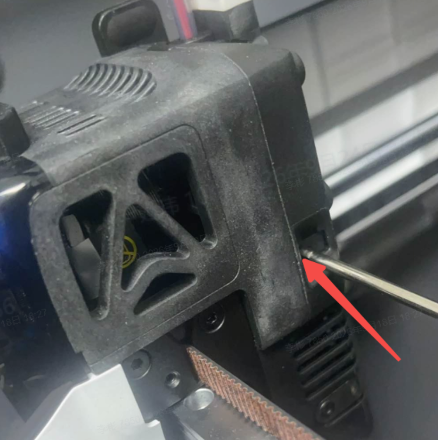
¶ Confirm whether the filament has been cut
Check whether the filament has actually been cut.
If the filament has not been cut, manually actuate the cutter to cut the filament, then try again.
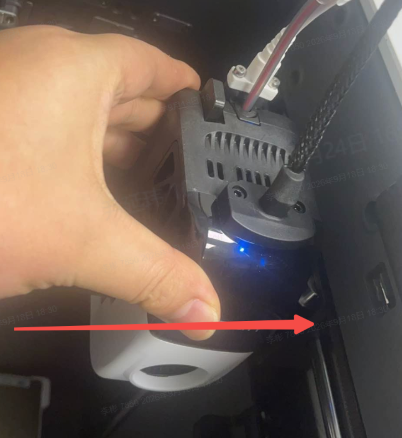
¶ Retry the operation
After resolving the above issues, tap the "Retry" button on the pop-up window.
If the retry is successful, the error will be automatically cleared.
¶ General troubleshooting steps:
Check whether the cutter is jammed, missing, or damaged.
Power off and restart the machine, then try again.
If the issue persists, it may indicate a hardware failure in the cutter assembly or the material break detection sensor, and further repair or replacement will be required.