¶ TR3263: Filament unloading exception — the extruder's filament break detection was abnormally triggered; the filament may have broken inside the extruder.
¶ Applicable model: K3
¶ Why does this prompt appear?
When the printer executes filament unloading, it needs to retract the filament normally from the extruder.
¶ If, during the unloading process, the system detects that the extruder's filament break detection sensor has been triggered for an extended period of time, this prompt will be triggered. Common causes include:
The filament has broken inside the extruder;
The filament became jammed during unloading and failed to retract normally;
Abnormal filament break detection status.
The most common situation is: the filament has broken, with a small piece remaining inside the extruder.
¶ How to resolve this issue?
¶ It is recommended to troubleshoot in the following order.
¶ Check whether the filament has been successfully unloaded
¶ First, check the current filament:
Whether the filament has been completely retracted from the nozzle inlet;
Whether there is a break in the external filament;
Whether the end of the retracted filament is intact.
If the filament is clearly broken, it indicates that a piece of filament may still be remaining inside the extruder, and further inspection is required.
¶ Try re-loading or re-unloading the filament
If the filament is not visibly broken, try performing a filament load or unload operation again.
Sometimes, an abnormal shape at the filament tip or excessive resistance during unloading can cause a single unloading attempt to fail. If the issue is resolved after retrying, no further action is needed.
If the error persists, proceed to inspect the inside of the extruder.
¶ Check for residual filament inside the extruder
If the external filament has been removed but the system still shows an unloading exception, it is likely that a small piece of filament has broken off inside the extruder or the filament feed path.
At this point, please check:
Whether any residual filament is visible near the extruder inlet;
Whether the filament is jammed in the extruder gear.
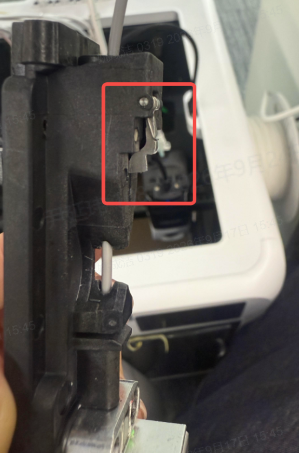
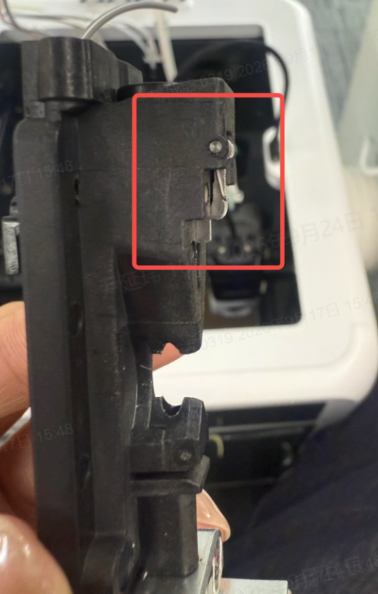
If no filament is visible at the inlet, this condition indicates the presence of a foreign object.
|
|
If residual filament is visible, remove it after the device has stopped moving.
¶ Reload filament after cleaning
¶ After confirming that the residual filament has been cleared:
Trim the end of the new filament straight;
Confirm that the filament has no obvious bends, swelling, or damage;
Reload the filament;
Perform a filament load operation and confirm that feeding and extrusion are functioning normally.
If filament loading returns to normal, the printer can continue to be used.
¶ Investigate other possible causes
¶ Check whether there is any foreign object blocking the nozzle's filament break detection sensor, or whether the filament break detection lever on the nozzle is jammed.
Locate the filament break detection lever on the nozzle and check:
Whether the lever is jammed by filament fragments or foreign objects;
Whether the lever can move freely;
Whether it can smoothly return to its original position after being released.
If the lever is jammed, remove the foreign object and gently move the lever to confirm it can return to its normal position.
¶ General troubleshooting steps:
Check whether the filament has been fully retracted
↓
Check whether the filament is broken or if there is residual filament
↓
Check whether the filament break detection sensor lever is jammed
↓
Remove foreign objects and confirm the lever can return to its normal position
↓
Perform a filament load/unload test
If TR3263 continues to occur repeatedly after completing all of the above checks, it is recommended to further inspect the filament break detection sensor, the extruder, and the filament feed path for any abnormalities.