¶ FP3280: Possible air printing detected. Please check for tangled filament, clogged nozzle, or extruder gear grinding before retrying.
¶ Applicable model: K3
¶ Why does this prompt appear?
During printing, the printer needs to continuously feed filament into the nozzle for normal extrusion. When the system detects that filament is not being fed or extruded as expected, it will indicate that air printing may be occurring.
¶ "Air printing" refers to
The printhead continues to move along the model path, but the nozzle is not extruding filament normally, or the actual amount of extruded filament is significantly insufficient.
¶ Common causes include:
Tangled filament: The filament on the spool is knotted or jammed, preventing further feeding;
Clogged nozzle: Filament cannot be extruded normally from the nozzle;
Jammed filament inside the extruder: The tip of the filament is bent or deformed, causing it to become wedged inside the extruder and preventing further feeding;
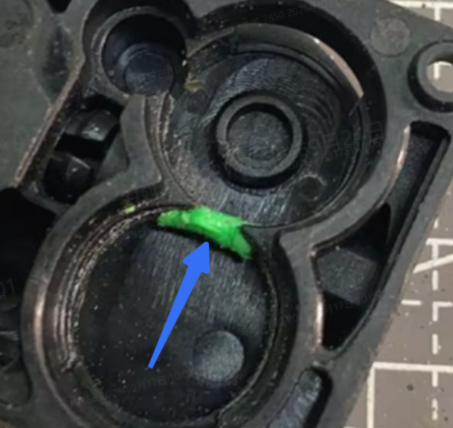
Extruder gear grinding: The extruder gear is unable to continue pushing the filament, continuously slipping or grinding against the filament surface;
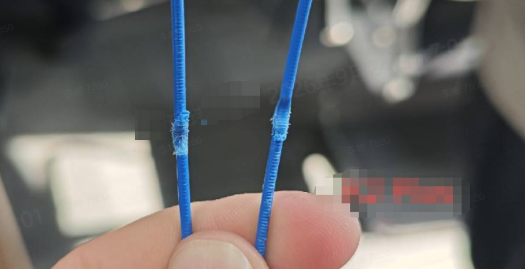
Active open/close mechanism abnormality: The active open/close mechanism is stuck, or has failed to close properly due to an abnormal upper stop bar, causing the extruder gear to be unable to grip the filament;
Abnormal filament feeding path: The filament encounters significant resistance or becomes jammed in the feeding path.
This prompt indicates that the system has detected a possible extrusion exception. It does not necessarily mean the nozzle is clogged. Please follow the steps below for further troubleshooting.
¶ Filament breakage:
- Brittle filament: Filament that has absorbed moisture, aged, or has inherently low toughness is prone to breaking when bent or pulled.
- Excessive feeding resistance: Tangled filament on the spool, poor spool rotation, or blockages in the PTFE tube and connectors cause abnormal stress on the filament.
- Excessive tubing bends: Sharp bends or kinks in the PTFE tube, or the tube being pulled taut during printhead movement, cause excessive localized stress on the filament.
- Locally damaged filament: Filament with pre-existing creases, indentations, or deformations breaks during the filament loading or unloading process.
¶ How to solve this?
It is recommended to perform checks in the following order:
¶ Check for tangled filament
¶ First, check the filament spool
Whether the filament is tangled or knotted;
Whether the spool can rotate normally;
Whether the filament is caught by the spool, spool holder, or other objects.
If tangled filament is found, please untangle the filament first and ensure it can be fed smoothly.
¶ Check for jammed filament in the extruder
¶ If the filament is not tangled but still cannot be fed normally, check whether the filament is jammed inside the extruder. Pay particular attention to whether the tip of the filament has:
Obvious bending;
Deformation;
Curling upward;
An uneven end.
After this type of filament enters the extruder, it may become wedged in the internal channel, preventing further forward feeding.
If jammed filament is confirmed, remove the abnormal filament, cut off the bent or deformed portion, and trim the filament end flat before reloading.
¶ Check the active open/close mechanism
¶ If there is no tangled or jammed filament but filament is still not extruding normally, check whether the active open/close mechanism is functioning properly. Focus on the following:
Whether the open/close mechanism lever is on the left side: When normally gripping the nozzle and printing, the lever should be on the left side;
Whether the upper stop bar of the extruder has properly extended: When normally gripping the nozzle and printing, the upper stop bar should be in the extended position.
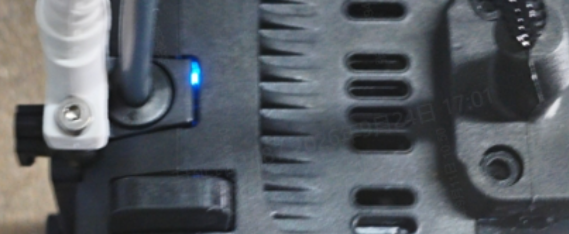 |
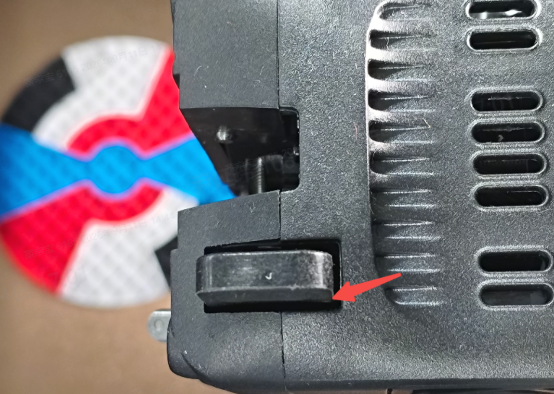 |
|
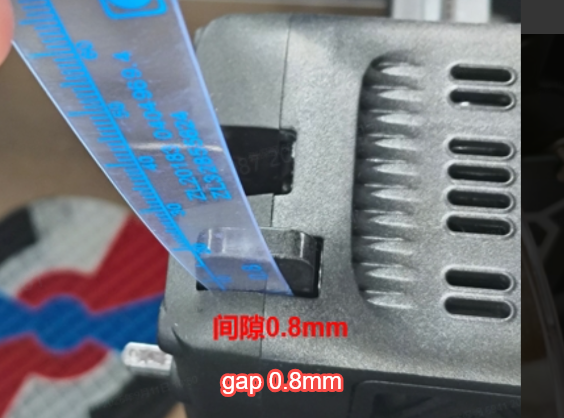
If the lever position is found to be abnormal or the upper stop bar has not extended properly, first stop the device movement, then try to manually restore the mechanism to its normal position, and perform filament feeding again.
If normal extrusion still cannot be achieved after restoration, continue troubleshooting for extruder gear grinding or nozzle clogging.
¶ Check for extruder gear grinding
¶ Check whether the filament entering the extruder shows obvious signs of gear slipping or abrasion. If the filament surface has already been worn with deep grooves by the extruder gear, the extruder may be unable to continue feeding normally.
¶ It is recommended to:
Unload the currently abnormal filament;
Cut off the worn portion;
Check for and clean up any filament debris accumulated near the extruder gear;
Reload the filament and try again.
If gear grinding occurs again shortly after reloading, continue checking whether the nozzle is clogged.
¶ Check for nozzle clogging
Heat the nozzle to the appropriate extrusion temperature for the current filament, then try manually extruding the filament.
Continuous, stable extrusion: The nozzle is generally free of significant clogging;
Unable to extrude, intermittent extrusion, or noticeably increased extrusion resistance: The nozzle may be clogged.
If nozzle clogging is confirmed:
Try heating the nozzle and reloading filament to push out any residual material;
If normal extrusion cannot be restored after multiple cleaning attempts, it is recommended to replace the nozzle.
¶ Handling Broken Filament
First, clear the broken filament, select one of the following methods based on the actual situation:
- Method 1: Manually pull out the broken filament from the PTFE tube, and continue printing using the remaining filament in the extruder. Once the remaining filament is used up, reload the filament and continue printing.
- Method 2: Unload the filament and then remove the broken filament. Perform the unload operation, and once the filament has been retracted from the extruder, manually pull out the broken filament from the PTFE tube.
After clearing the broken filament, investigate the cause to reduce the likelihood of it happening again:
- Check whether the filament has become noticeably brittle, and replace it if necessary.
- Check whether the filament spool is tangled and whether it rotates smoothly.
- Check whether the PTFE tube and its connectors are clogged, kinked, or under tension.
- If the filament repeatedly breaks at the same location or during the same filament loading/unloading action, record the break location, filament type, and a video of the abnormality, then contact after-sales support for further investigation.
¶ General troubleshooting steps:
When FP3280 occurs, you can quickly troubleshoot in the following order:
Check the filament spool for tangles
↓
Check whether filament is jammed inside the extruder
↓
Check the active open/close mechanism
↓
Check whether the filament has been ground by the extruder gear
↓
Check whether the nozzle is clogged
↓
Reload filament and confirm normal extrusion
↓
Retry printing
If FP3280 continues to occur frequently after completing all of the above checks, please stop printing and further inspect the filament feeding mechanism, extruder, and nozzle for any mechanical abnormalities.