¶ FD3255: Extruder filament break detection exception. Please check whether the filament has broken.
¶ Applicable models: K3
¶ Why does this prompt appear?
The filament in the channel has broken during printing, causing no filament to be fed into the extruder.
¶ How to resolve it?
¶ Check the filament path
Check along the filament path for any breaks or jammed filament
Pay particular attention to whether the filament between the extruder inlet and the nozzle is broken
¶ Check the filament break detection sensor
Check the filament break detection light status: blue light on when filament is present; light off when no filament is present
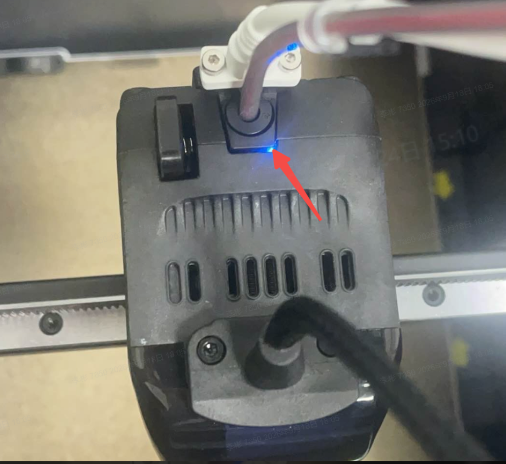
¶ Recovery after troubleshooting
After resolving the above issues, click the "Confirm" button on the pop-up window to close it and resume printing
If the issue still cannot be resolved, there may be a hardware failure in the filament break detection sensor
¶ General troubleshooting steps
Check the filament path for any breaks
Power off, restart the machine, and try again
If the issue persists, there may be a hardware failure in the filament break detection sensor, requiring further repair or replacement