¶ FD3254: Extruder filament break detection exception — the nozzle may not be clamped securely. Please check the nozzle status and try again.
¶ Applicable models: K3
¶ Why does this prompt appear?
The nozzle was not properly positioned during a head swap, or the extruder's filament break detection sensor is malfunctioning.
¶ How to resolve this issue?
¶ Check the nozzle installation status:
Confirm whether the nozzle on the current extruder is fully clamped and properly seated.
Check for any looseness, misalignment, or incomplete engagement of the nozzle.
If the nozzle is not clamped, manually mount the nozzle correctly onto the extruder.
¶ Check the filament break detection sensor:
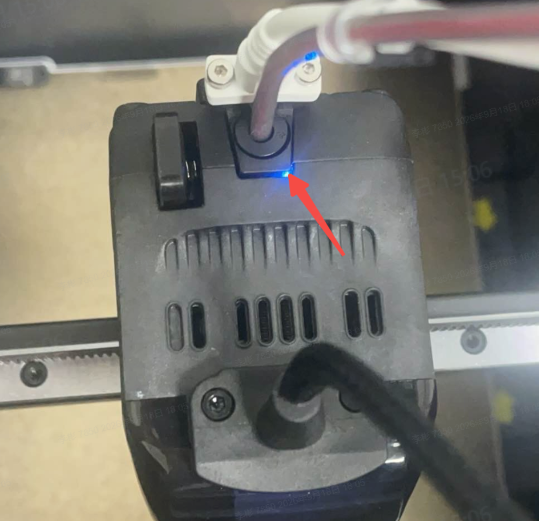
Check the status of the filament break detection indicator light: blue light on when filament is present; light off when no filament is present.
¶ Retry the operation:
After resolving the above issues, click the "Retry" button on the pop-up window.
If the retry is successful, the error will be automatically cleared.
¶ General troubleshooting steps
Power off and restart the machine, then try again.
Check whether the nozzle buckle / locking mechanism shows any signs of wear or deformation.
If the issue persists, it may indicate a hardware failure of the filament break detection sensor, and further repair or replacement will be required.