¶ Phenomenon Description
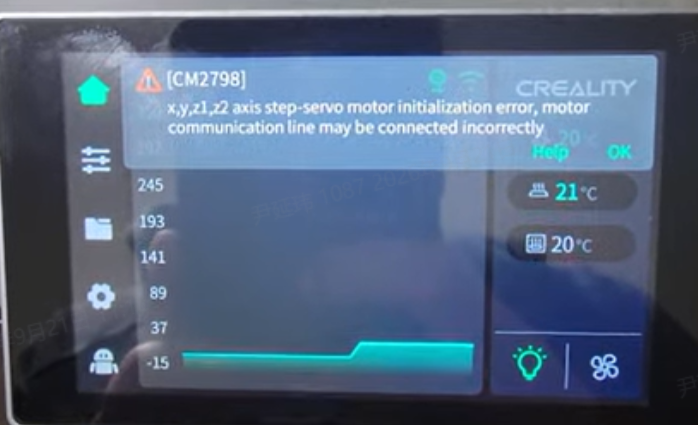
Upon powering on, error 2798 is immediately reported, with X/Y/Z1/Z2 motors all reporting errors simultaneously.
¶ Cause Analysis
- Caused by extruder motor communication issues
- Communication exception between the adapter board and the upper computer board
- 485 communication issue with the lower computer board
¶ Troubleshooting
First, power off the machine, then unplug the E-axis motor ribbon cable from the printhead board, then power on and check whether X/Y/Z1/Z2 motor communication errors are still reported (E-axis errors are expected and can be ignored for now, since the E-axis motor cable has been deliberately unplugged for testing). If the errors are no longer reported, this confirms an E-axis motor issue — replace the E-axis motor. If the errors persist, continue troubleshooting using the steps above.
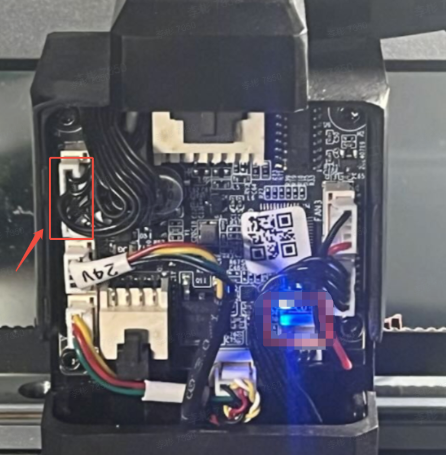
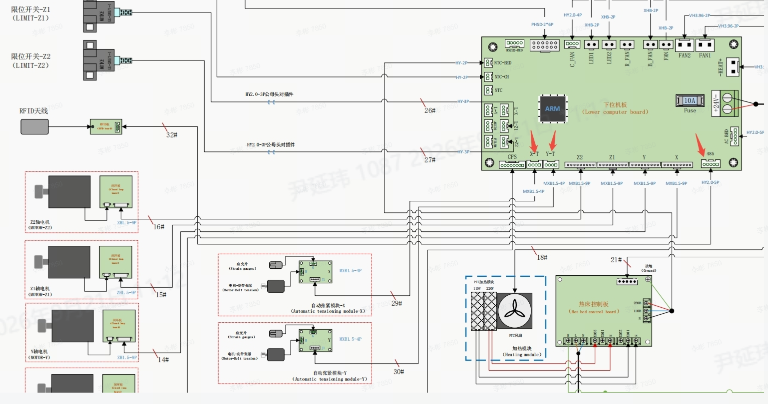
Confirm whether the FPC ribbon cable on the upper computer adapter board has been properly inserted and pressed into place (the connector has locking tabs — a common issue is that the cable is not fully inserted, preventing it from being fully pressed in).
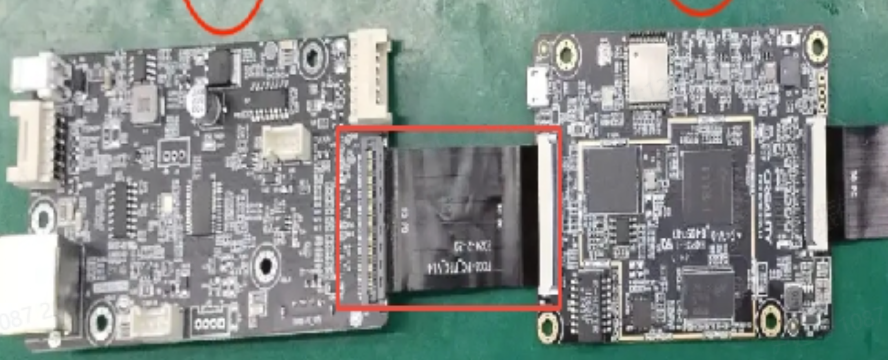
¶ If the machine still simultaneously reports errors for X, Y, Z1, and Z2 after following the steps above, proceed with the following troubleshooting steps:
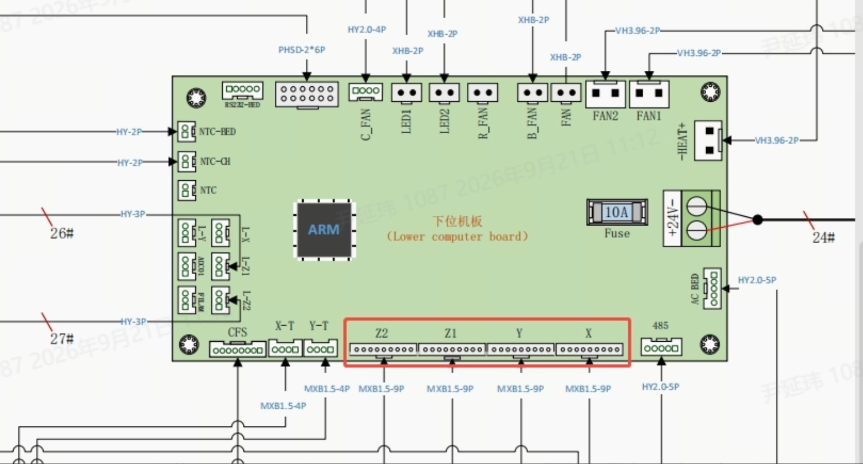
Step 1: Disconnect all 7 slave device cables on the 485 bus, including: the lower computer board CFS ribbon cable, X/Y/Z1/Z2 axis motors, and the XY belt tensioning module (ribbon cable shown below). First, identify 1 slave device with fully normal communication to serve as a reference baseline for subsequent troubleshooting.
Step 2: Connect only the X-axis motor, power on the machine, wait for the system error pop-up, and observe the error 2798 content:
If the error does not include the currently connected motor (e.g., the error changes to 2798 Y Z1 Z2): this indicates that both the bus and the currently connected motor are functioning normally. This motor can be used as the baseline device — proceed to the next step.
If all 4 motors are still reported as having communication errors, or the error includes the currently connected motor: this indicates that the motor is most likely faulty. Power off and replace it with another motor, then repeat the above steps until 1 motor that communicates normally is found to serve as the baseline.
Step 3: Fault localization — gradually reconnect devices to identify the abnormal module.
Using the confirmed baseline motor as a reference, gradually reconnect the remaining devices to locate the source of the fault:
Keep the baseline motor connected to the bus at all times; power off before connecting 1 (or a batch of) remaining slave device(s) each time.
¶ After powering on, observe the communication status of the baseline motor
- If the previously normal baseline motor also develops a communication error and the 2798 error includes the baseline motor: the newly connected module is the faulty device — replace it individually and retest to confirm.
- If the baseline motor communication remains normal: the currently connected module has no issues — continue connecting the next batch of devices.
Repeat the above steps until all abnormal devices have been identified.
¶ Follow-up Solution
If the machine continues to report error 2798 for X, Y, Z1, Z2 regardless of which troubleshooting step is followed, replace the lower computer mainboard.