¶ Tools
Cutting Pliers
¶ Processing Steps
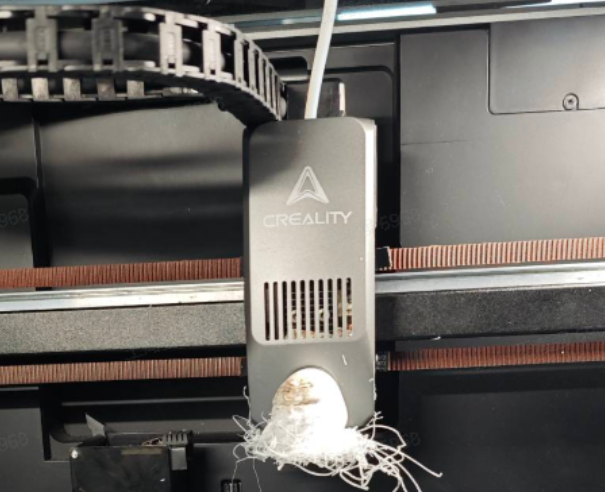
Click to unlock the motors on the screen control interface, lower the platform to the bottom, and move the extruder to a convenient position for operation.
Remove the nozzle cover. If the hotend clumping is severe and cannot be removed, consider breaking the nozzle cover (risk of nozzle cover damage).
According to the material of the current hotend clumping, increase the nozzle temperature until it exceeds the recommended printing temperature of the filament (e.g., for PLA, the recommended printing temperature is 190℃~230℃, so it's recommended to heat the nozzle to 250℃). After heating, wait for a period of time (about 5-8 minutes).
Wear heat-resistant gloves or use cutting pliers or other tools to try to remove the hotend clumping from the hotend. Moving it from side to side or back and forth may make it easier to remove.
After cleaning the larger chunks of hotend clumping, set the nozzle temperature to 30℃ and wait for the nozzle to cool down. Note: If the heat break fan is stuck and difficult to clean, the nozzle will cool down slowly. Be patient and careful of burns. You can use a hair dryer (on cool setting) to assist cooling.
Use a wrench or screwdriver to manually push the cutter to cut the filament.
Use a hex wrench to unscrew the four screws securing the hot end assembly, carefully unplug the hotend and thermistor cables, and remove the hotend.
Clean the remaining hotend clumping residue, carefully cleaning the heat break fan, hotend PCB board, and other areas (risk of heat break fan damage, risk of hot end PCB damage).
Clean the hotend. If severely damaged, consider replacing the entire hotend assembly (risk of hot end assembly damage).
After cleaning, reinstall the hot end assembly, reconnect the hot end and thermistor cables properly, and reinstall the nozzle cover.
Ensure there is no filament in the extruder, select "Pattern Optimization" on the calibration page, and wait for the machine to complete self-inspection before continuing to use.
¶ Parts That May Be Damaged
If severe wrapping occurs, the following components may be damaged. It is recommended to determine whether replacement is needed based on the actual situation:
Hotend
Hotend adapter board
Model fan
Heat break fan
Nozzle camera
¶ How to Avoid
Hotend clumping may be caused by several factors:
Confirm that the material matches the slicing file. If the filament used and the slicing file don't match (e.g., slicing parameters are for PLA but ABS is used for printing), the mismatched filament parameters, extrusion temperature, and platform temperature will prevent the model from adhering to the print platform. Always ensure the sliced material matches the actual filament before printing.
Keep the hot bed clean. If the hot bed surface is dirty, the model can easily detach. It is recommended to regularly clean the platform with detergent or other degreasing products, or evenly apply the glue stick included in the package to the print bed to enhance adhesion.
Confirm the ambient temperature. If below 15 degrees, it is recommended to increase the hot bed temperature by 10 degrees.
If the model has a small contact area with the bed, add a skirt for small, delicate models.