¶ Direct Import
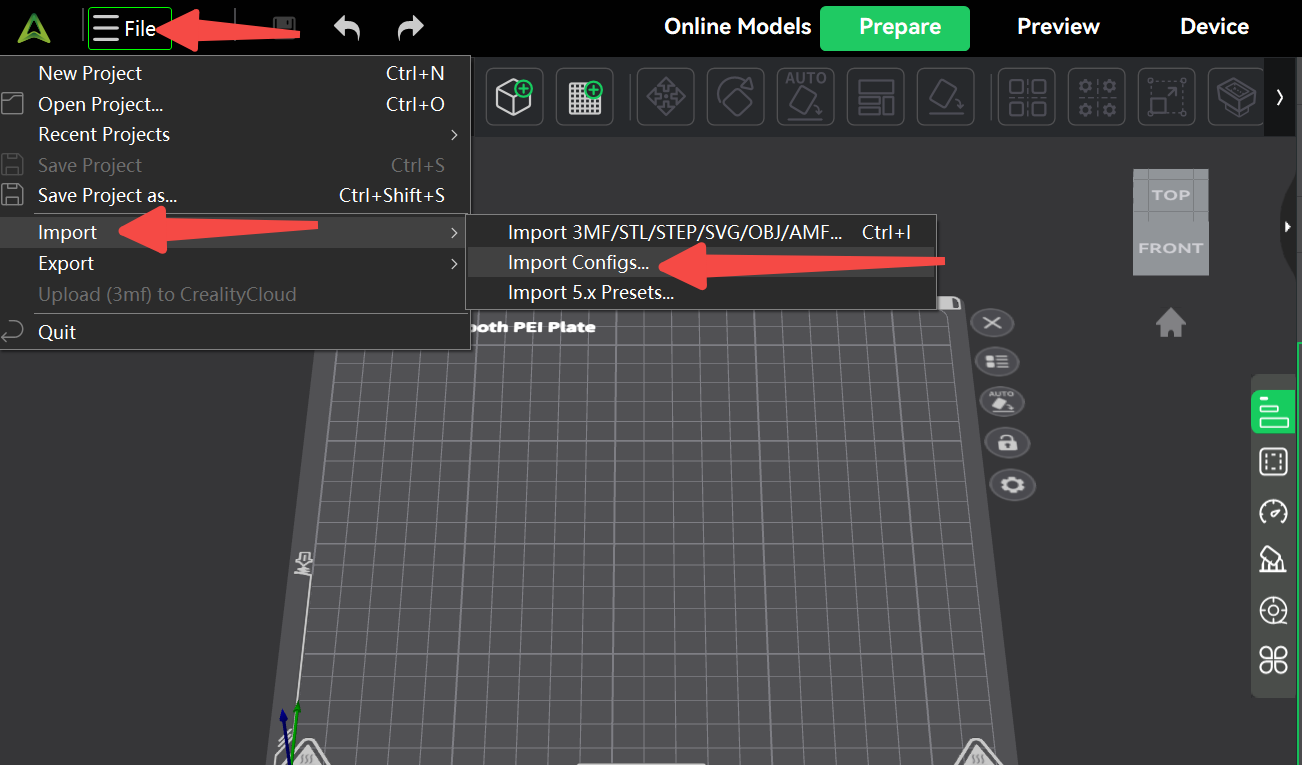
In the upper right corner, click [File], [Import], [Import Configuration], then select the corresponding configuration file.
Creality K1 0.2 nozzle.creality_printer
Creality K1 Max 0.2 nozzle.creality_printer
Creality K1 SE 0.2 nozzle.creality_printer
Creality K1C 0.2 nozzle.creality_printer
¶ Manual Parameter Configuration
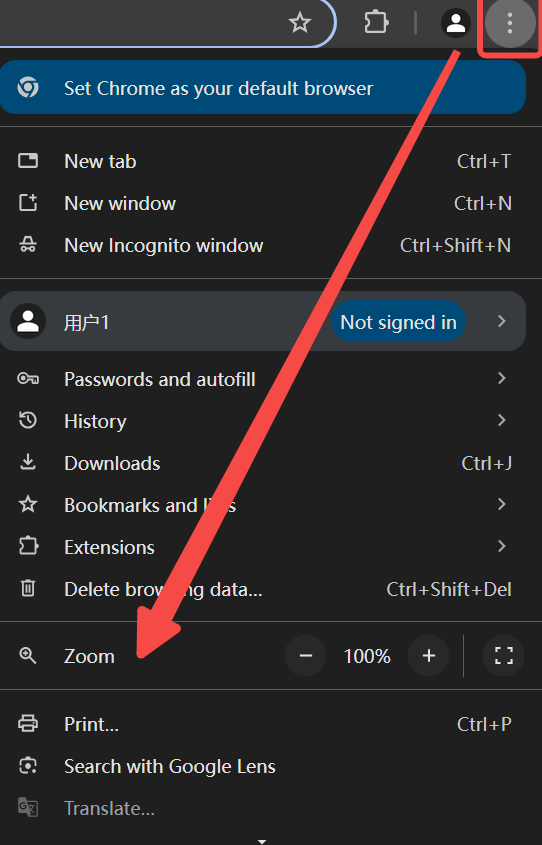
For the best reading experience, we recommend setting your browser's zoom level to 75% for full information.
¶ Parameter table
Refer to the parameter table configuration, manually modify the corresponding 0.2 nozzle configuration parameters for the printer according to the following steps.
|
1.Configure Printer parameters: |
K1C 0.2 | K1MAX-0.2 | K1-0.2 | K1 SE-0.2 | ||||||
| Extruder |
Size |
Nozzle diameter | 0.2 | 0.2 | 0.2 | 0.2 | 0.2 | 0.2 | 0.2 | 0.2 |
|
Layer height limts |
Min | 0.04 | 0.04 | 0.04 | 0.04 | 0.04 | 0.04 | 0.04 | 0.04 | |
| Max | 0.14 | 0.14 | 0.14 | 0.14 | 0.14 | 0.14 | 0.14 | 0.14 | ||
|
Retraction |
Length | 0.8 | 0.8 | 0.8 | 0.8 | 0.8 | 0.8 | 0.8 | 0.8 | |
| Z hop type | trapezoidal/Slope |
trapezoidal |
||||||||
| Traveling angle | 3 | 3 | 3 | 3 | 3 | 3 | 3 | 3 | ||
| Retraction speed | 30 | 30 | 30 | 30 | 30 | 30 | 30 | 30 | ||
| Deretraction speed | 30 | 30 | 30 | 30 | 30 | 30 | 30 | 30 | ||
| Travel distance threshold | 1 | 1 | 1 | 1 | 1 | 1 | 1 | 1 | ||
| Retract amount before wipe | 90 | 90 | 90 | 90 | 90 | 90 | 90 | 90 | ||
| Wipe distance | 2 | 2 | 2 | 2 | 2 | 2 | 2 | 2 | ||
|
2.Configure Slicer parameters: |
K1C 0.2 | K1MAX-0.2 | K1-0.2 | K1 SE-0.2 | ||||||
| Quality | Layer Height | Layer height mm | 0.1 | 0.1 | 0.1 | 0.1 | 0.1 | 0.1 | 0.1 | 0.1 |
| First layer height mm | 0.14 | 0.14 | 0.14 | 0.14 | 0.14 | 0.14 | 0.14 | 0.14 | ||
| Line Width | Default mm | 0.22 | 0.22 | 0.22 | 0.22 | 0.22 | 0.22 | 0.22 | 0.22 | |
| Strength | Walls | Wall loops | 4 | 4 | 4 | 4 | 4 | 4 | 4 | 4 |
| Top/bottom shell | Top sheel layers | 7 | 7 | 7 | 7 | 7 | 7 | 7 | 7 | |
| Bottom shell layers | 5 | 5 | 5 | 5 | 5 | 5 | 5 | 5 | ||
| Infill | Sparse infill density | 15% | 15% | 15% | 15% | 15% | 15% | 15% | 15% | |
| Sparese infill pattern |
Grid |
|||||||||
| Infill/wall overlap | 30% | 30% | 30% | 30% | 30% | 30% | 30% | 30% | ||
| Speed | First layer speed | First layer | 18 | 18 | 18 | 18 | 18 | 18 | 18 | 18 |
| First layer infill | 30 | 30 | 30 | 30 | 30 | 30 | 30 | 30 | ||
| Other layer velocities | Outer wall | 110 | 110 | 110 | 110 | 110 | 110 | 110 | 110 | |
| Inner wall | 130 | 130 | 130 | 130 | 130 | 130 | 130 | 130 | ||
| Sparse infill | 120 | 120 | 120 | 120 | 120 | 120 | 120 | 120 | ||
| Internal solid infill | 120 | 120 | 120 | 120 | 120 | 120 | 120 | 120 | ||
| Top surface | 100 | 100 | 100 | 100 | 100 | 100 | 100 | 100 | ||
| Gap infill | 50 | 50 | 50 | 50 | 50 | 50 | 50 | 50 | ||
| Suspension speed | overhang speed | 0/40/20/10 | 0/40/20/10 | 0/40/20/10 | 0/40/20/10 | 0/40/20/10 | 0/40/20/10 | 0/40/20/10 | 0/40/20/10 | |
| Brige External | 40% | 40% | 40% | 40% | 40% | 40% | 40% | 40% | ||
| Brige Internal | 120% | 120% | 120% | 120% | 120% | 120% | 120% | 120% | ||
| Acceleration | Normal printing | 10000 | 10000 | 10000 | 10000 | 10000 | 10000 | 10000 | 10000 | |
| Outer wall | 3000 | 3000 | 3000 | 3000 | 3000 | 3000 | 3000 | 3000 | ||
| Inner wall | 3000 | 3000 | 3000 | 3000 | 3000 | 3000 | 3000 | 3000 | ||
| First layer | 2000 | 2000 | 2000 | 2000 | 2000 | 2000 | 2000 | 2000 | ||
| Top surface | 2000 | 2000 | 2000 | 2000 | 2000 | 2000 | 2000 | 2000 | ||
| accel to decel | 75% | 75% | 75% | 75% | 75% | 75% | 75% | 75% | ||
| Travel | 10000 | 10000 | 10000 | 10000 | 10000 | 10000 | 10000 | 10000 | ||
| Jerk(XY) | Default | 3 | 3 | 3 | 3 | 3 | 3 | 3 | 3 | |
| Outer wall | 3 | 3 | 3 | 3 | 3 | 3 | 3 | 3 | ||
| Inner wall | 3 | 3 | 3 | 3 | 3 | 3 | 3 | 3 | ||
| Infill | 3 | 3 | 3 | 3 | 3 | 3 | 3 | 3 | ||
| Top surface | 3 | 3 | 3 | 3 | 3 | 3 | 3 | 3 | ||
| First layer | 3 | 3 | 3 | 3 | 3 | 3 | 3 | 3 | ||
|
3.Configure Filament parameters: |
K1C 0.2 | K1MAX-0.2 | K1-0.2 | K1 SE-0.2 | K1C 0.2 | |||||
| Filament | Basic information | Type | Hyper PLA | CR-PETG | Hyper PLA | CR-PETG | Hyper PLA | CR-PETG | Hyper PLA | CR-PETG |
| Vendor | Creality | Creality | Creality | Creality | Creality | Creality | Creality | Creality | ||
| Nozzle(mm) | 0.2 | 0.2 | 0.2 | 0.2 | 0.2 | 0.2 | 0.2 | 0.2 | ||
| Flow ratio | 0.98 | 0.97 | 0.98 | 0.98 | 0.98 | 0.97 | 0.97 | 0.97 | ||
| Enable pressure advance | Yes | Yes | Yes | Yes | Yes | Yes | Yes | Yes | ||
| Pressure advance | 0.23 | 0.29 | 0.24 | 0.29 | 0.26 | 0.28 | 0.25 | 0.3 | ||
| Printer chamber temprature | Chamber temprature (℃) |
35 | 35 | 35 | 35 | 35 | 35 | 35 | 35 | |
| Print temprature | Print temprature (℃)(℃) | 220 | 250 | 220 | 250 | 220 | 250 | 220 | 250 | |
| Flow Temperature Graph | [[0.3,190], [0.4,190], [0.5,220]] | [[0.3,220], [0.4,220], [0.5,250]] | [[0.3,190], [0.4,190], [0.5,220]] | [[0.3,220], [0.4,220], [0.5,250]] | [[0.3,190], [0.4,190], [0.5,220]] | [[0.3,220], [0.4,220], [0.5,250]] | [[0.3,190], [0.4,190], [0.5,220]] | [[0.4,220],[0.5,220],[0.6,250]] | ||
| Bed temprature | Bed temprature (℃) | 50 | 70 | 50 | 70 | 50 | 70 | 60 | 80 | |
| Volumetric speed limitation | Max volumetric speed | 3 | 2.5 | 3 | 2.5 | 3 | 2.5 | 3 | 2.5 | |
| Cooling | Model fan | Min fan speed threshold (%) | 100 | 40 | 100 | 40 | 100 | 40 | 100 | 40 |
| Min Layer time (s) | 12 | 12 | 12 | 12 | 12 | 12 | 12 | 12 | ||
| Max fan speed threshold(%) | 100 | 80 | 100 | 80 | 100 | 80 | 100 | 80 | ||
| Max Layer time (s) | 100 | 30 | 100 | 30 | 100 | 30 | 100 | 30 | ||
| Min Print speed(mm/s) | 20 | 20 | 20 | 20 | 20 | 20 | 20 | 20 | ||
| Keep fan always on | Yes | Yes | Yes | Yes | Yes | Yes | Yes | Yes | ||
| Cooling overhang threshold | 50% | 10% | 50% | 10% | 50% | 10% | 50% | 10% | ||
| Fan speed for overhang(%) | 100 | 90 | 100 | 90 | 100 | 90 | 100 | 90 | ||
| Side Fan | Fan speed(%) | 80 | 0 | 80 | 0 | 80 | 0 | 0 | 0 | |
| Setting Overrides | Retraction | Z hop type |
Slope |
|||||||
¶ Configure Printer Parameters
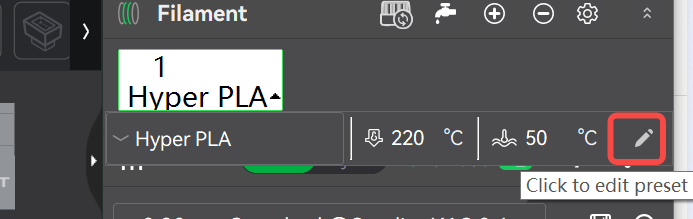
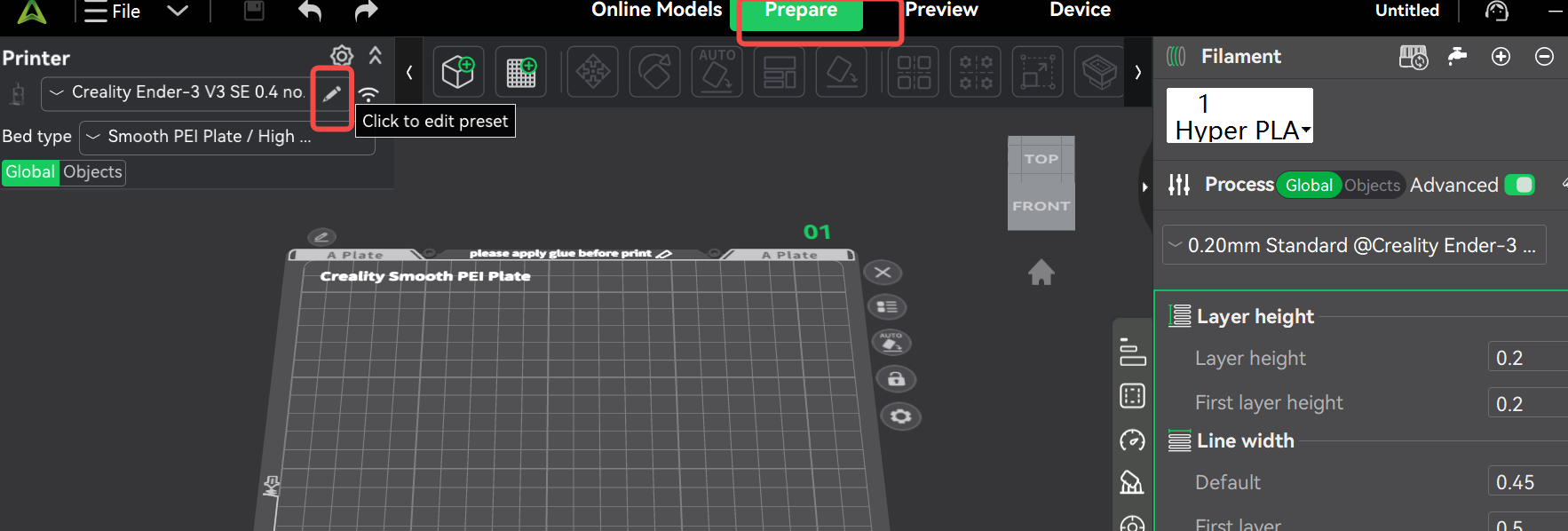
Open Creality Print, enter the [Prepare] interface, and click the [Pen] icon in the upper left corner.
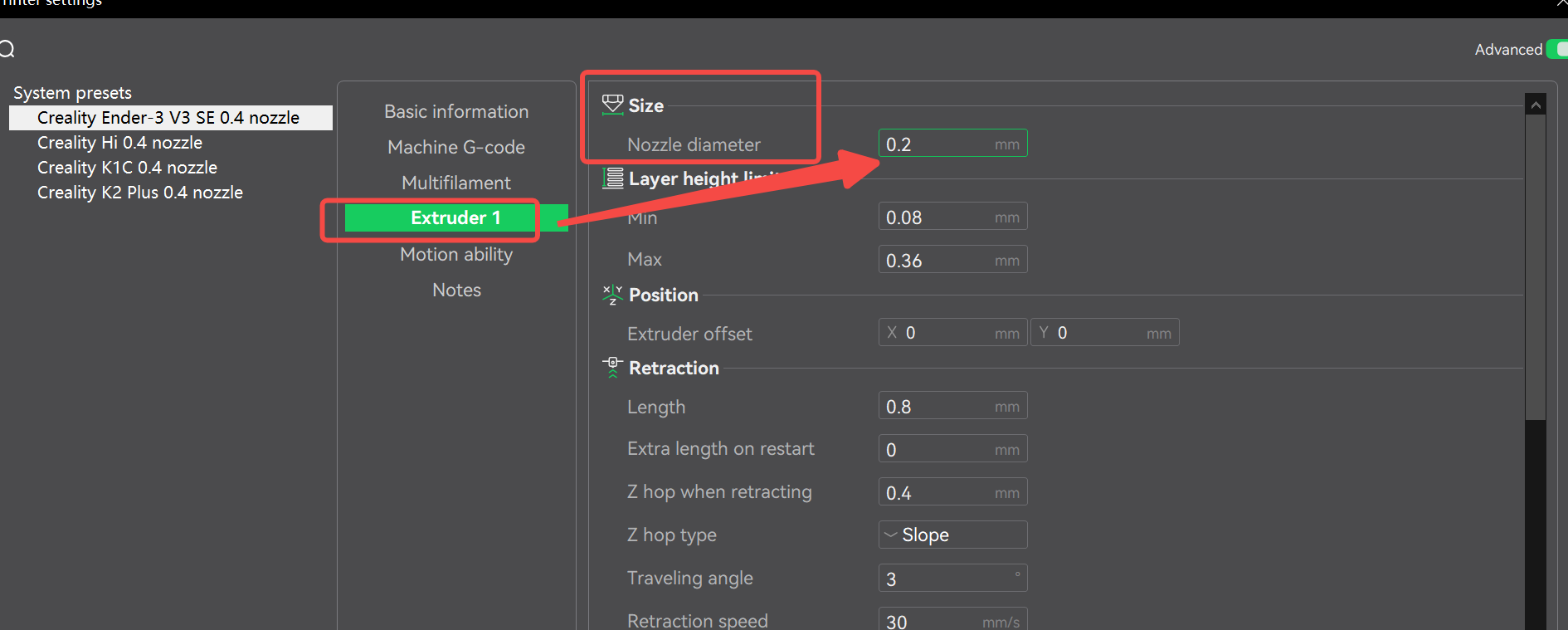
Enter the configuration page, select [Extruder], then fill in the configuration parameters according to the table parameters corresponding to the machine model and filament.
¶ Configure slicing parameters
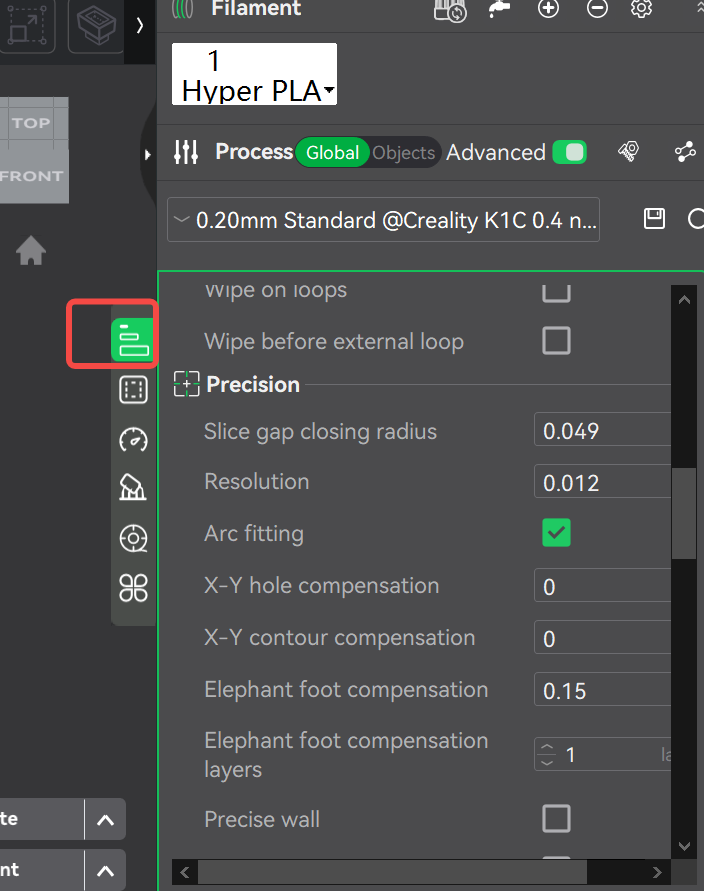
Select the corresponding configuration items in the parameter column on the right side of the overall page.
¶ Configure Filament Parameters
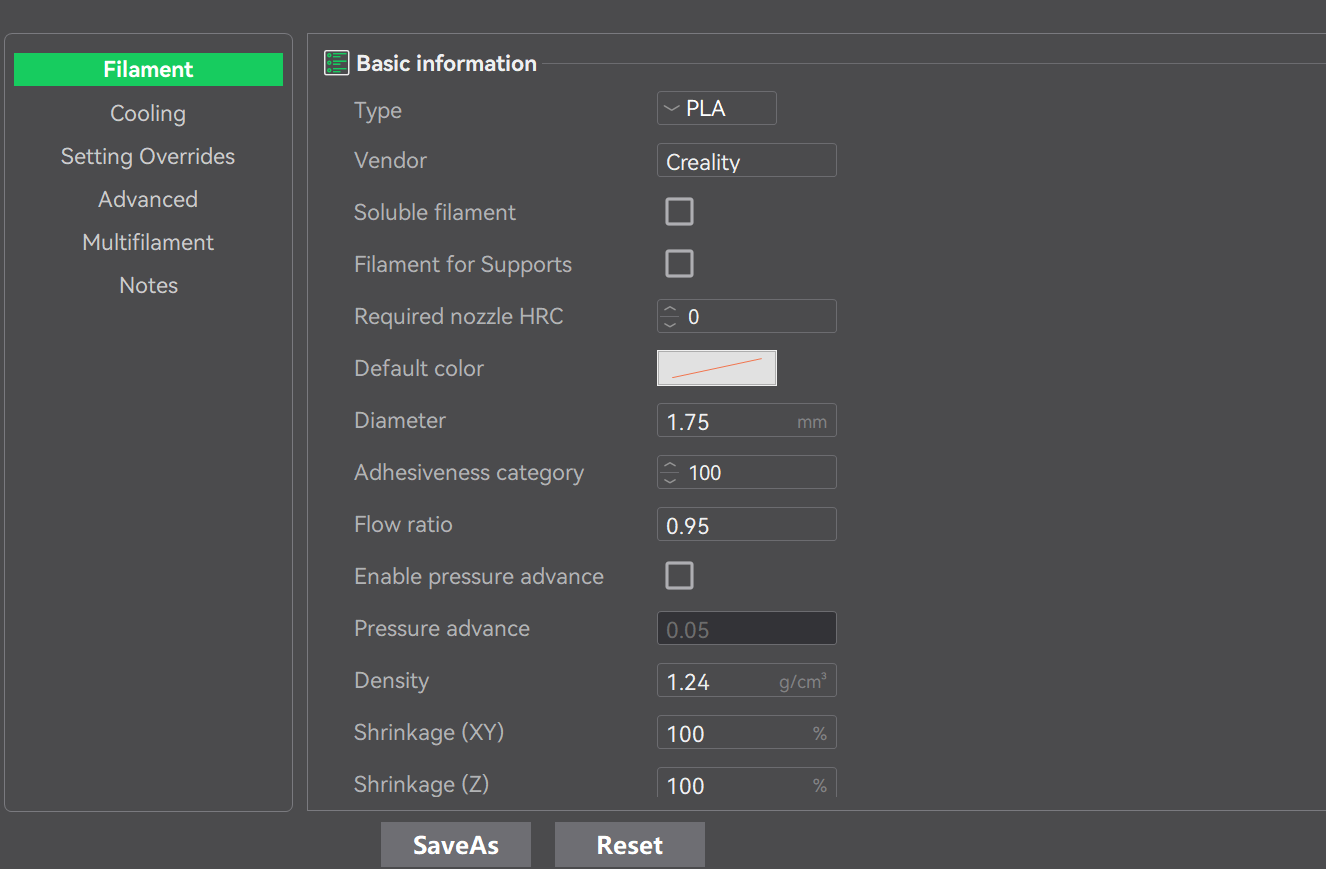
On the right side of the overall page parameter column, first select the "+" to add a new filament, then click on the descriptive text of the newly added filament to display the related menu, and click the [Pen] button to enter the filament configuration interface.