¶ Hardware
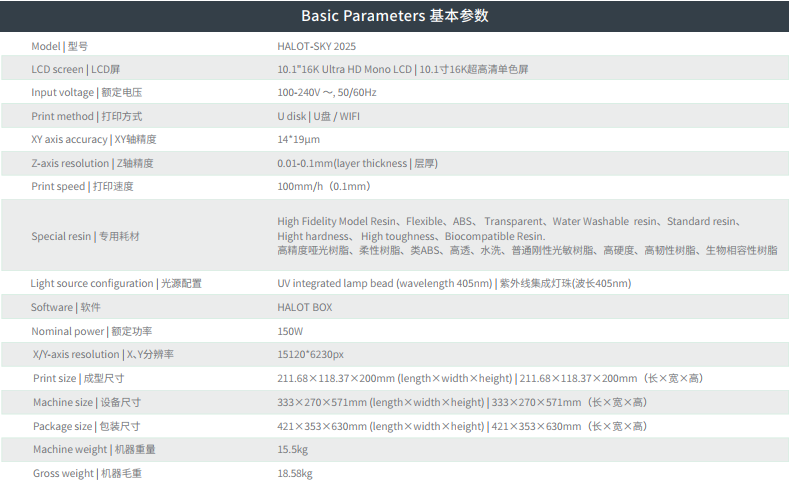
Q: Can you provide the main technical specifications for the HALOT-SKY 2025?
A: Hello, below are the detailed technical specifications for the HALOT-SKY 2025.
Q: What is the approximate lifespan of the screen, UV light, and release film?
A: Under normal usage and maintenance conditions, the theoretical lifespan of the core components is as follows:
- LCD Screen: Approximately 3,000 hours
- UV Light: Approximately 20,000 hours
- Release Film (FEP): Approximately 70,000 layers
Note: Actual lifespan may vary depending on the operating environment, frequency of use, maintenance, and other factors.
Q: What are the dimensions of the HALOT-SKY 2025 release film?
A: The dedicated release film dimensions are 286mm × 198mm × 0.3mm.
Q: Do all USB cameras support the time-lapse photography function?
A: The HALOT-SKY 2025's time-lapse feature supports third-party USB cameras, provided the camera outputs video in the H.264 format. For optimal compatibility and experience, we recommend using the official "Nebula Camera" accessory.
Q: What is the maximum USB drive capacity the device can read?
A: The device has no strict upper limit on capacity for USB drives. However, using non-original or poor-quality drives may lead to read failures or file corruption due to capacity misrepresentation or compatibility issues. Note: The USB drive must be formatted as FAT32.
Recommendation: To ensure stable print data transfer, please use qualified, genuine brand USB drives.
Q: Is it normal for there to be air bubbles inside the screen protector film?
A: This is a normal phenomenon. If air bubbles are observed beneath the tempered glass protector prior to use, they can be pushed out using a plastic scraper. Afterwards, the outermost protective film should be removed. Bubbles located near the edges do not affect print quality.
Q: Does the HALOT-SKY 2025 have an air purification or exhaust function?
A: Yes, the device has a built-in exhaust module. You can connect the included exhaust tubing to vent gases generated during printing to a window. This helps improve air quality in the operating environment and ensures safety during the printing process.
Q: The machine uses a factory-leveled build plate. Can it still be manually leveled?
A: Yes. The HALOT-SKY 2025 features a factory-leveled design to simplify operation for beginners. The build plate has individually adjustable leveling screws on all four corners. If you feel it's necessary during use, you can always perform manual fine-tuning by referring to the official Build Plate Leveling Tutorial.
Q: What sensors are built into the printer, and where are they located?
A: The printer mainly includes the following sensor:
- Z-axis Limit Switch: Located at the top of the Z-axis, it defines the maximum upward travel limit for the build platform.
- Temperature Sensor: Located near the light source module, it is used to monitor temperature for controlling heat dissipation from the light array.
¶ Software
Q: Can HALOT BOX set different parameter configurations for different resin materials?
A: Yes. In the parameter section of the HALOT BOX slicing software, you can create and save independent parameter configurations (such as exposure time, lift speed, etc.) for each resin, allowing for easy selection when needed.
Q: How do I send files over the network and monitor the printer remotely?
A: Please ensure the device and your computer/phone are connected to the same local area network (LAN).
- Sending Files: After slicing in HALOT BOX, select "Send via Network", then choose your printer from the device list (it should show as "Idle").
- Remote Monitoring: After binding your device through the Creality Cloud App, you can view print progress in real-time, preview layers, and receive print completion notifications.
Q: Can light supports be used for large or heavy models?
A: Not recommended. For large or heavy models, medium or heavy supports must be used to ensure reliability. Simultaneously, it is strongly recommended to hollow the model and design reasonable drainage holes to reduce suction forces and save resin.
Q: After slicing, does the exported STL file contain resin printing parameters and support settings?
A: No. The STL file exported from the slicing software contains only geometric model data. All resin printing parameters and support structure information are saved in the sliced output file with the .cxdlpv4 format. Furthermore, when exporting as STL, the original supports become solidified parts of the model geometry and can no longer be edited.
Q: How should I handle the printer freezing when printing a sliced file?
A: This issue is usually caused by a mismatch between the slicer software version and the printer firmware version. Please troubleshoot following these steps:
- Check and ensure you are using the latest version of the HALOT BOX software.
- Check if the printer firmware is the latest version (check via Device Settings > System Update).
- Try re-slicing the model with the latest software and then sending it to the printer again.
Q: Does HALOT BOX support automatically adding supports between multiple models?
A: The current version of HALOT BOX does not yet support auto-generating supports across multiple models. You need to add supports to each model individually before arranging and slicing them together.
¶ Printing
Q: Can it print castable (jewelry) resins?
A: Yes, it can print them. However, if you are using resins not listed in the official recommendations, you will need to manually calibrate and optimize the print parameters (such as exposure time, lift speed, etc.) to achieve the best results.
Q: Can resins like 'ABS-like' be printed at a 0.03mm layer height? Are there recommended parameters?
A: Yes, it can be printed. The official parameter library may not have a standard 0.03mm layer height profile. You can try this: Based on the existing 0.05mm layer height parameters for that resin, reduce the normal exposure time by approximately 20% . Other parameters (like lift speed) can remain unchanged initially, and then validate and fine-tune through test prints.
Q: Can high-speed resin be printed with a 0.1mm layer height?
A: To balance speed and detail quality, it is recommended to prioritize using a 0.05mm layer height for printing. Using a 0.1mm layer height may affect surface fineness; please weigh this based on the actual requirements of your model.
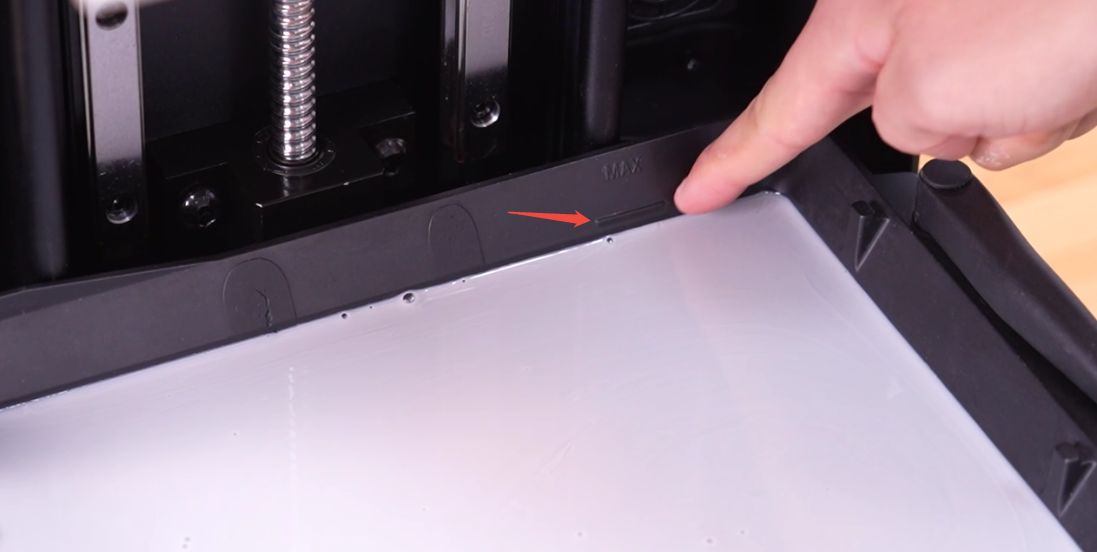
Q: How much resin is appropriate to add to the vat?
A: It is recommended that the resin level does not exceed the "MAX" line marked on the side wall of the vat. Typically, a single fill is suggested to be under 500ml. The exact amount should be determined based on the model size and print height.
Q: How do I delete files from the printer?
A: Operate on the device touchscreen:
- Click 【Print】 to enter the 【Local Print List】 .
- Tap the 【Edit】 button in the top right corner.
- Select (check) the slice files you wish to delete.
- Tap the 【Delete】 button and confirm.
Q: What UV wavelength resin is the HALOT-SKY 2025 suitable for?
A: The HALOT-SKY 2025's UV light source has a wavelength of 405nm, making it suitable for 405nm wavelength photopolymer resins.
Q: What is the regular print speed of the HALOT-SKY 2025?
A: The maximum print speed can reach 100mm/h. However, in practical use, to obtain better surface quality and print success rates, it is recommended to use a relatively lower speed based on model complexity.
Q: What is Adaptive Mode?
A: Adaptive Mode is an intelligent feature. When enabled, if the system detects a drastic change in the projection area ("cross-section") of a particular slice layer, it will automatically fine-tune the exposure parameters for that layer based on the current settings. This helps reduce layer lines or deformations caused by differences in UV energy accumulation, thereby improving print quality.
Q: After a print finishes, I can't send the next file remotely. The software shows "Device Busy." What should I do?
A: Please manually navigate back to the device's main home screen on the printer's touchscreen. After a short moment, the device status in HALOT BOX or the Creality Cloud App will update to "Idle" , allowing you to continue sending new tasks.
Q: What is the smallest model size it can print?
A: The printer's extreme detail capability is approximately 0.2mm diameter micro-holes or micro-pillars. For common small models, features in the range of 0.25 - 3mm are typically achievable.
Q: How can I remove the resin odor produced during printing?
A: Odor generation during the photopolymer resin printing process is normal. To effectively minimize the impact of the odor, we recommend the following measures:
- Ensure the Exhaust System is Functioning Properly: Please check that the included exhaust tubing is securely connected and vented to a window to direct odors outside. Ensure the exhaust function remains on throughout the entire printing process.
- Delay Opening the Cover After Printing: Once printing is complete, do not open the printing chamber cover immediately. It is recommended to allow the exhaust system to continue running for several minutes to thoroughly remove fumes before opening the cover to handle your models.
- Pay Attention to Installation and Environmental Requirements:
- It is recommended to properly install the exhaust tubing by creating a vent hole in your workshop wall or window to ensure directed and effective ventilation.
- Ensure the printing chamber is not in an excessively low-temperature environment. Also, avoid exposing the operating device to direct sunlight or other strong natural light, as this helps maintain resin stability and reduces unnecessary volatilization.
Q: Is it normal for there to be noise during printing?
A: This is normal. The sounds during printing mainly come from:
- Cooling fans operating.
- The Z-axis motor driving the build platform up and down.
- The normal sound of the build platform separating from the release film.
These sounds are all part of the machine's normal operation.
Q: How do I solve continuous and repeated print detachment (not sticking to the build plate) issues?
A: Repeated detachment is often caused by multiple factors. Please systematically troubleshoot using the following guide: Build Plate Ahesion Issue Solution
Q: Prints fail with repeated detachment in low-temperature environments. What should I do?
A: Low temperature is a common cause of resin thickening and poor flow, which can lead to print detachment from the build plate.
Maintain Ambient Temperature: Turn on air conditioning or heating to ensure the printing environment stays within the recommended range of 20°C - 35°C, with 25°C being ideal.
Q: Why do prints turn white or feel somewhat sticky after printing? How can this be improved?
A: This is typically caused by incomplete post-processing washing.
- Cause: Uncured resin or washing alcohol (95%+ purity) residue remains on the model surface.
- Improvement Methods:
- Thorough Washing: Ensure the model surface is completely cleaned using sufficient, clean alcohol.
- Complete Drying: After washing, ensure the model is completely air-dried with no liquid residue on the surface. You can use an air blower gun to dry the alcohol from the model surface.
Q: Does the HALOT-SKY 2025 have a time-lapse photography function?
A: Yes, it is supported. To use this function, you need:
- Hardware: Connect the Creality Nebula Camera via the USB port.
- Settings: Enable the Time-lapse function on the printer's touchscreen.
- Viewing: After printing is complete, you can view and generate the time-lapse video for that print in the Creality Cloud App.
Q: Where can I view the total operating hours of the HALOT-SKY 2025 machine?
A: The current firmware version does not yet provide a feature to view the device's total operating hours. However, you can monitor the usage lifespan of core consumables:
- To view Release Film usage duration: Go to 【Settings】 -> 【System Settings】 -> 【Printer Maintenance】 on the device.
Q: I heard the touchscreen has a screensaver. Why doesn't my machine play the screensaver animation during printing?
A: The screensaver function may require a specific firmware version. Please: Go to 【Settings】 -> 【System Settings】 -> 【Update】 -> 【OTA】 and update the device firmware to the latest version to use this function.
Q: What does the "Model File Verification Error" message on the machine mean? How can it be resolved?
A: This error indicates that the printer model information contained within the sliced file does not match the HALOT-SKY 2025. Please resolve it from the following aspects:
- Check Slicer Software: Confirm you are using the latest version of HALOT BOX software and have correctly selected "HALOT-SKY 2025" as the printer model when slicing.
- Re-slice: Re-slice the model using the correct settings.
- Check File Source: Avoid using slice files generated for other printer models or unverified files downloaded from the internet.
Q: What is the recommended temperature for resin printing?
A: All corresponding resin profiles for the HALOT-SKY 2025 are developed based on testing conducted in an environment of 25-35°C. It is recommended to print within this ambient temperature range to achieve optimal print quality and ensure successful prints.