¶ What are the differences between CFS 2 and CFS?
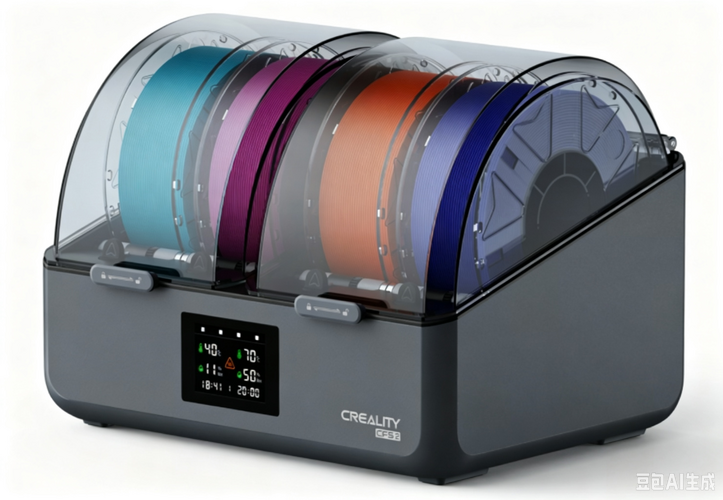
CFS 2 is Creality's next-generation intelligent filament management system.
Compared to the previous generation CFS, CFS 2 not only optimizes filament feeding and hardware structure, but more importantly introduces active drying, dual-slot independent temperature control, and intelligent temperature and humidity management capabilities.
The differences between the two, in brief:
CFS focuses primarily on multi-color filament feeding and basic filament storage; CFS 2 goes a step further by integrating filament feeding, drying, dehumidification, and storage into a single filament management system.
For users who frequently work with moisture-prone materials such as PA, PC, and ABS, or who require extended print sessions, the upgrades in CFS 2 will be significantly more noticeable.
From a structural standpoint, the buffer, front and rear drive shafts, and Creality 485 cable are compatible between CFS 2 and CFS, while all other components are not interchangeable.
|

|
¶ CFS vs CFS 2 Main Differences
|
Comparison Items |
CFS |
CFS 2 |
|
Drying |
Does not support drying |
Supported, up to 85℃ |
|
Temperature Control Method |
Single-slot design |
Dual-slot independent temperature control |
|
Filament Storage |
Basic storage |
Intelligent temperature and humidity monitoring + active intervention |
|
Dehumidification During Printing |
Not supported |
Supported |
|
Filament Inlet |
PTFE filament inlet |
Metal filament inlet |
|
Display Method |
Segment display + indicator light |
LCD display screen |
|
Filament Remaining Management |
— |
Supports remaining quantity recording, display, and status updates |
|
PTFE Tube Replacement Method |
More steps required for replacement and disassembly |
Remove and detach the bottom cover plate to replace |
|
Desiccant |
Single-color desiccant |
ndicator color-changing desiccant is reusable |
¶ Biggest Change: CFS 2 Adds Drying Functionality
One of the most notable differences between the CFS 2 and the previous generation CFS is the addition of drying capability. CFS has no drying function, whereas the CFS 2 can reach a maximum internal temperature of 85°C.
For common materials such as PLA and PETG, moisture absorption may cause issues like stringing; while engineering materials such as PA, PC, and ABS are even more sensitive to humidity. Once filament absorbs moisture, problems such as bubbling, clogged nozzles, and reduced inter-layer adhesion may also occur.
Therefore, CFS 2 is no longer solely responsible for "storing filament" — it can also perform drying management before filament enters the printer and throughout the printing process.
The core objective is: To keep filament in a print-ready condition when needed, and to reduce printing issues caused by moisture-absorbed filament.
¶ From single-chamber to dual-chamber independent temperature control
CFS 2 adopts a 2+2 dual-chamber independent temperature control design.
The left and right chambers can be set to different operating temperatures, allowing materials with different drying requirements to be processed simultaneously.
For example:
One side can be set to a maximum of 85°C for materials with higher drying requirements such as PA-CF, PC, and ABS;
The other side can be set to a lower temperature for materials such as TPU, PETG, and PLA.
Compared to the single-chamber design of the CFS, this means users no longer need to frequently adjust the entire filament slot's drying conditions for different materials.
¶ From "storing filament" to actively managing filament
CFS 2 has made significant upgrades to filament management. It divides the entire process into four stages:
Drying → Printing → Dehumidifying → Storage
¶ Drying
CFS 2 can actively dry filaments based on their condition, and provides recommended drying temperatures and times.
The maximum chamber temperature of 85°C is primarily designed to meet the deep dehumidification needs of highly hygroscopic engineering materials.
¶ Printing
CFS 2 supports simultaneous drying (dehumidifying) and printing.
This means users do not need to dry the filament for several hours before removing it for printing. Instead, the filament can remain in the filament management system, staying dry while being used for printing.
¶ Dehumidifying
During the printing process, the system can continue to dehumidify, reducing the re-absorption of moisture from the air by the filament during long printing sessions.
This is especially valuable for large model prints that last dozens of hours.
¶ Storage
CFS 2 continuously monitors internal temperature and humidity.
The product specifications state a target of achieving a low-humidity storage environment of ≤35%, and reducing filament re-absorption through active intervention.
Therefore, compared to the basic storage capability of CFS, CFS 2 is closer to an actively operating filament management system.
¶ Filament Inlet Upgraded to Metal Structure
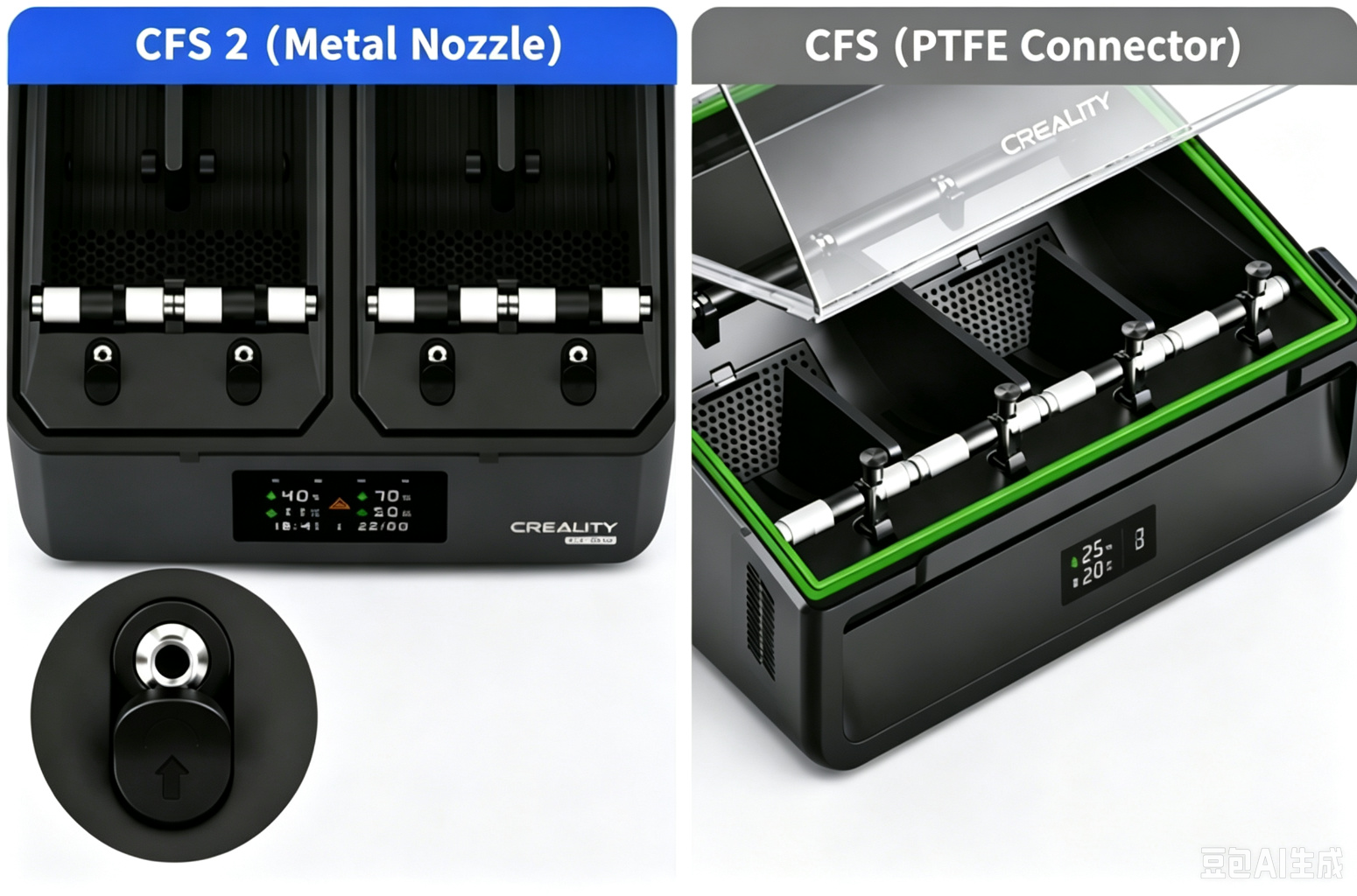
The PTFE filament inlet on the CFS is subject to potential wear during long-term filament feeding.
CFS 2 upgrades this position to a metal filament inlet.
This change is primarily aimed at long-term, high-frequency filament feeding scenarios, improving the durability of this critical filament feeding position.
While it may not be as immediately noticeable as features like 85°C drying or dual-chamber temperature control, it represents an important hardware structural upgrade for users who rely on the CFS system over the long term.
¶ Display Method Upgrade
The previous generation CFS used: a segment display screen + indicator lights
CFS 2 has been upgraded to: an LCD liquid crystal display
The new display method can more intuitively present device and filament channel-related information.
At the same time, CFS 2 supports filament remaining quantity recording, display, and status updates, allowing users to more directly understand the current filament status.
¶ Improved Replacement Convenience for Wear Parts
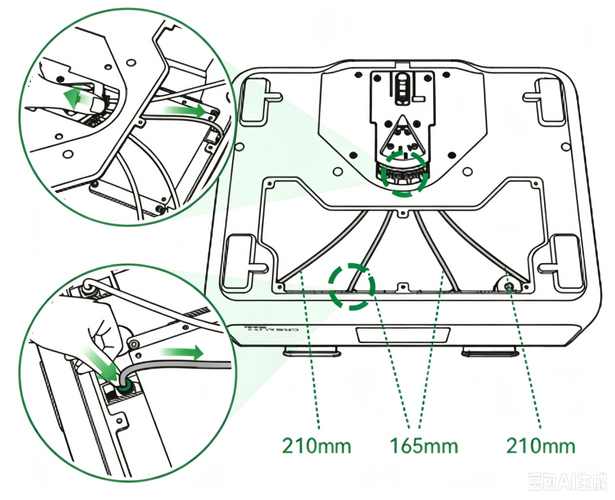
CFS 2 features an optimized disassembly structure for the PTFE tubes inside the unit. When the PTFE tubes become worn after prolonged use, they can be removed and replaced directly without complex disassembly, reducing the difficulty of maintaining and replacing wear parts.
¶ Desiccant Status Visualization Upgrade
Compared to the CFS, the CFS 2 has been upgraded to use indicator desiccant, which allows users to intuitively determine the desiccant status through color changes, making it convenient for users to perform timely maintenance and replacement.
¶ What additional filament types does CFS 2 support compared to CFS?
Note: For the types of filaments supported by CFS 2 and printing precautions for different filaments, please refer to the Wiki article: CFS 2 Supported Filaments and Precautions for Printing with Different Filaments
When CFS 2 is used with different printers, the actual supported filament types are subject to the product specifications of the corresponding printer.
Compared to CFS, CFS 2 further expands its filament compatibility, adding support for a wider range of engineering filaments, fiber-reinforced filaments, and flame-retardant filaments, including PET, PA, PP, ABS-CF/GF, PLA-GF, PETG-CF/GF, PET-CF/GF, PA-GF, PPS-CF, ABS-FR, and more. It also adds support for Creality ASA, providing users with a richer selection of materials to meet the printing needs of more professional and engineering application scenarios.
|
Filament Series
|
Filament Type
|
Brand
|
Compatibility |
|
Regular filament |
ASA |
Creality |
✓ |
|
Engineering Filament |
PET |
Generic |
✓ |
|
PA |
Generic |
✓ |
|
|
PP |
Generic |
✓ |
|
|
Fiber-reinforced filament |
ABS-CF |
Generic |
✓ |
|
ABS-GF |
Generic |
✓ |
|
|
PLA-GF |
Generic |
✓ |
|
|
PETG-CF |
Generic |
✓ |
|
|
PETG-GF |
Generic |
✓ |
|
|
PET-CF |
Generic |
✓ |
|
|
PET-GF |
Generic |
✓ |
|
|
PA-GF |
Generic |
✓ |
|
|
PPS-CF |
Generic |
✓ |
|
|
Flame-retardant filament |
ABS-FR 阻燃耗材 |
Generic |
✓ |
¶ Can CFS 2 be used together with the original CFS?
Yes, CFS 2 is currently mainly compatible with the K2 series printers, including the K2 Plus, K2 Pro, and K2.
For users who have already purchased K2 series printers, CFS 2 can be used after upgrading to the corresponding firmware.
All compatible printers upgraded to version 1.1.6.7 and later will be supported.
More importantly, users who already own a CFS can use both CFS and CFS 2 simultaneously on the same printer after purchasing CFS 2.
Please note:
CFS 2 is not compatible with CFS-C, CFS Lite, or CFS Nano.
The specific compatibility range and required firmware versions are subject to the officially released software and compatibility documentation.
¶ Is it necessary to upgrade to CFS 2 if I already have a CFS?
This largely depends on the filament being used and the printing scenario.
Situations where continuing to use the CFS is appropriate
The existing CFS can still handle multi-color filament feeding and basic filament management tasks.
Particularly considering that the CFS and CFS 2 can be used together in the same compatible printer, users do not necessarily need to phase out their existing CFS.
Situations where adding a CFS 2 is more suitable
If you frequently use filaments that are more sensitive to humidity, such as PA, PC, ABS, carbon fiber/glass fiber reinforced materials, the upgrade value of the CFS 2 will be more significant.
It is capable of providing:
Active drying up to 85°C + dual-chamber independent temperature control + dehumidification during printing + intelligent low-humidity storage.
For scenarios involving long print jobs, engineering material printing, and mixed multi-material usage, it can reduce the effort users spend on drying filament and managing materials separately.
¶ How should I understand CFS and CFS 2?
If you want to understand the two generations of products in the simplest way: CFS addresses "how to automatically manage and feed multiple filament spools," while CFS 2 builds on this by further addressing "how to keep filament in a consistently print-ready condition during both storage and printing."
Therefore, the core upgrade of CFS 2 is not simply the addition of a "drying" feature, but rather the integration of: filament feeding, drying, in-print dehumidification, and low-humidity storage into a more complete and unified filament management workflow.
¶ FAQ
Q: What is the maximum heating temperature of CFS 2?
The maximum chamber temperature is 85°C.
Q: Do both slots have to use the same temperature?
No. CFS 2 supports independent temperature control for each slot, allowing different drying conditions to be set for different materials.
Q: Can filament still be dried during printing?
Yes. CFS 2 supports simultaneous drying (dehumidification) and printing, and can continuously manage filament humidity throughout the printing process.
Q: Can CFS 2 be used together with the original CFS?
Yes. CFS and CFS 2 can be used together on the same compatible printer.
Q: Do I need to replace my original CFS after purchasing CFS 2?
Not necessarily. The two can handle different filament management tasks. Materials that require active drying can be placed in CFS 2 first, while other materials can continue to be used with the existing CFS.
Q: Which users will most noticeably benefit from the CFS 2 upgrade?
Users who frequently print engineering materials, use moisture-sensitive filaments, perform long print jobs, or need to manage different types of materials simultaneously will more readily notice the improvements CFS 2 brings in terms of active drying, independent temperature control, and humidity management.