¶ Applicable models: K2 Series
¶ Why does this prompt appear?
This prompt indicates that during active drying or automatic dehumidification, the heating temperature in the right or left slot of the CFS2 has been detected to exceed the safety upper limit. To prevent excessively high temperatures inside the slot from affecting the filament, filament spool, or device hardware, the system will stop the active drying/automatic dehumidification function.
¶ How to solve this?
- Wait for the device to cool down: When this prompt appears, stop the drying task first and wait for the temperature inside the CFS2 slot to drop.
- Check the thermistor readings: Confirm whether the temperature displayed on the screen for the slot interior is reasonable, and check for temperature fluctuations, excessively high readings while the unit is not actually hot, or clearly abnormal temperature readings. If the temperature is clearly abnormal, the corresponding thermistor needs to be replaced.
- Check whether the fan is running: After entering the drying or dehumidification function, place your palm over the air outlet to feel whether the corresponding R slot/left slot or L slot/right slot fan has started, whether air is being blown out through the air duct, and whether the temperature of the blown air is excessively high. Re-plug the fan cable on the mainboard side. If you still cannot feel the fan running, the corresponding fan needs to be replaced. If the temperature is excessively high, the corresponding heating assembly needs to be replaced.
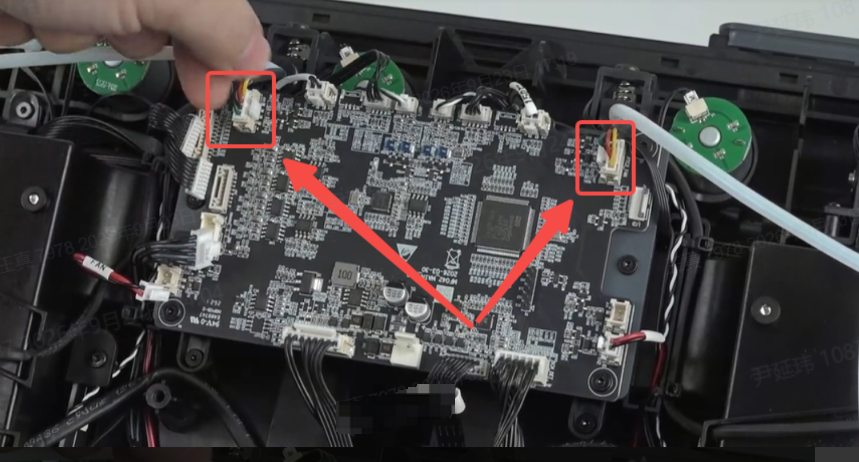
¶ General troubleshooting steps:
- Immediately stop the active drying/automatic dehumidification task, and wait for the CFS2 slot body and heating area to cool down completely before opening the top cover for inspection.
- Check whether the air duct inlet and outlet of the slot are blocked, and confirm that the fan blades are not jammed by foreign objects.
- After restarting the device, enter the device temperature and humidity display interface, and observe whether the temperature readings of the corresponding slot are close to the actual ambient temperature.
- If the fan is functioning normally but the temperature still exceeds the upper limit, check the corresponding R/L slot heating assembly for signs of ablation, deformation or detachment, short circuit marks, or damaged wiring.
- Re-secure the heating assembly terminals and test again. If the fault persists, replace the corresponding R/L slot heating assembly or temperature and humidity sensor.
- Restart the device, enter the active drying/automatic dehumidification function, and observe whether the temperature rises steadily without exceeding the upper limit again.