¶ Why does this prompt appear?
This prompt indicates that the heating assembly of the right or left slot of CFS 2 is malfunctioning, with abnormal temperature feedback, or the system has detected that the corresponding slot cannot be heated to the target temperature of 38°/45°. Therefore, the device will stop to prevent temperature runaway or further hardware damage from continued operation.
¶ How to resolve this issue?
- Check temperature feedback: Confirm whether the temperature displayed inside the slot on the CFS 2 screen is normal, and whether there are any obviously unreasonable temperature readings, such as negative values or readings above 100°C. If this occurs, re-plug the chamber thermistor port on the mainboard and restart the machine. If the issue persists, the corresponding chamber thermistor needs to be replaced.
If you have a thermometer at home, you can also place it inside the slot to check whether the temperatures are consistent. - Re-plug the heating harness and chamber thermistor terminals: After powering off the device, check whether the heating assembly connector of the corresponding slot is loose or has poor contact.
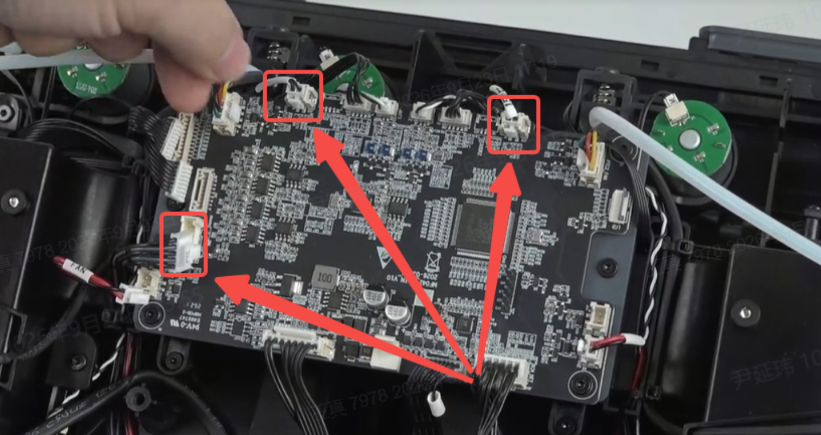
- Replace the heating assembly: If the heating assembly cannot heat up, heats up too slowly, or shows visible damage, the corresponding R/L slot heating assembly needs to be replaced.
¶ General troubleshooting steps:
- Inspect the appearance of the corresponding R/L slot heating assembly to confirm whether there is any burning, deformation, cracking, detachment, or wire damage.
- If the temperature does not rise or the temperature reading is abnormal, power off the device, then re-secure the heating assembly terminals, temperature sensor terminals, and related harnesses.
- If the fault persists, replace the corresponding R/L slot heating assembly.
- Restart the device, re-enter the drying/dehumidification function, and observe whether the corresponding slot can heat up normally.