¶ Why does this prompt appear?
This prompt indicates that the heating fan in the right or left chamber of the CFS2 is malfunctioning. The system has detected that the heating fan is unable to rotate normally. The device will stop the automatic dehumidification/filament drying function to prevent abnormal temperature and humidity control inside the chamber or further hardware damage caused by continued operation.
¶ How to solve it?
Restart the drying process after the print has finished.
Check whether the fan is rotating: After activating the drying or dehumidification function, place your palm over the air outlet to feel whether the corresponding R chamber/left chamber or L chamber/right chamber fan has started and whether airflow is coming through the air duct. Re-plug the fan cable on the mainboard. If you still cannot feel the fan rotating, the corresponding fan needs to be replaced.
If the fan is rotating normally, listen for any abnormal noise. If abnormal noise is detected, replace the corresponding fan.
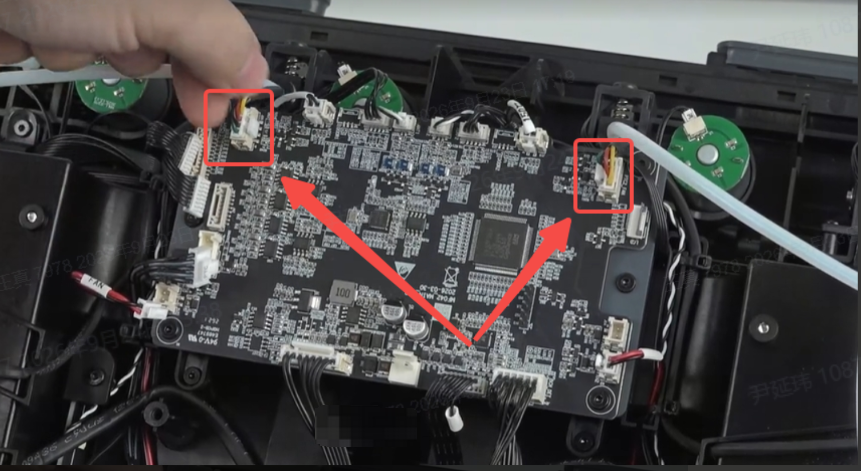
If the fan rotates normally and there is no abnormal noise, but the machine continuously reports a fan fault, replace the corresponding fan.
Check the mainboard: If the fault persists after replacing the fan, there may be an issue with the CFS2 mainboard. The corresponding components will need to be replaced to restore normal functionality.
¶ General Troubleshooting Steps
Open the top cover of the CFS2, remove the filament spool from the corresponding slot, and check whether there are any filament fragments, broken filament, desiccant bags, or other foreign objects near the fan.
Restart the device, activate the automatic dehumidification/filament drying function, and observe whether the fan in the corresponding chamber operates normally. If the fault persists, replace the corresponding R/L chamber fan.
If the fault is still present after replacing the fan, check the CFS2 control board, fan driver circuit, and connecting harness.
Restart the device and observe whether the chamber fan returns to normal operation.