¶ Applicable Models: K2 Series
¶ Why does this prompt appear?
This prompt indicates that the temperature sensor in the right or left slot of the CFS2 is malfunctioning, and the system is unable to read the temperature data of the corresponding slot. When the temperature sensor is abnormal, the device will stop the active drying/auto-dehumidification function to avoid incorrect temperature readings, abnormal drying performance, or heating control failure.
¶ How to resolve this?
- Check temperature feedback: Confirm whether the temperature displayed on the CFS2 screen is normal, and whether there are any obviously unreasonable temperature readings, such as negative values or readings above 100°C. If this occurs, re-seat the chamber thermistor port on the mainboard and restart the machine. If the issue persists, the corresponding chamber thermistor needs to be replaced.
If you have a thermometer at home, you can also place it inside the slot to check whether the temperatures are consistent. - Check sensor connections: Check whether the temperature sensor wiring harness and connector of the corresponding slot are loose, disconnected, or have poor contact. Confirm that the temperature sensor and its cables are not damaged, broken, or compressed by filament or filament spools.
- Re-seat the relevant terminals: After powering off, re-secure the temperature sensor terminals and the control board connectors to rule out temporary poor contact.
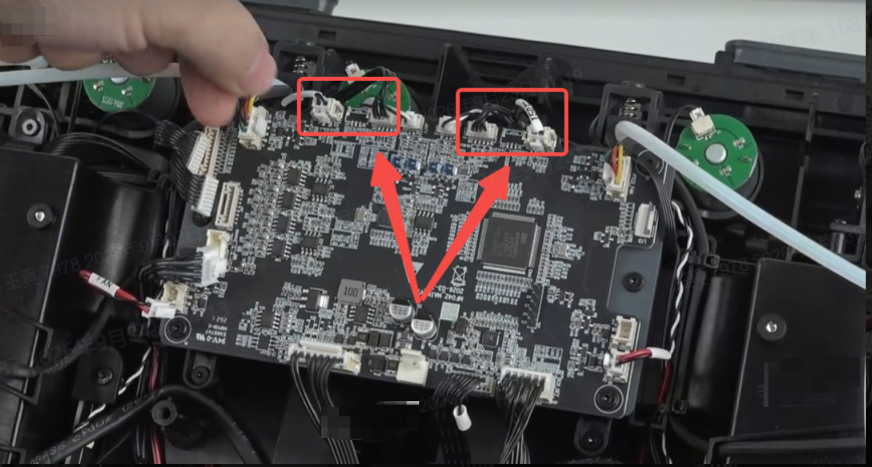
- Replace the temperature sensor: If the connection is normal but the temperature data still cannot be read, or the temperature readings continue to be abnormal, the corresponding R/L slot temperature sensor needs to be replaced.
¶ General Troubleshooting Steps:
- Inspect the appearance of the corresponding slot's temperature sensor, and confirm that the sensor body and cables are free from damage, breakage, crushing, contamination, or moisture.
- Check whether the temperature sensor terminals, control board connectors, and related wiring harnesses are loose, disconnected, or have poor contact.
- After re-securing the temperature sensor terminals and related wiring harnesses, reinstall the filament spool and close the CFS2 top cover.
- Restart the device. If the temperature reading remains at 0°C, shows no data, stays fixed, fluctuates abnormally, or clearly does not match the actual ambient temperature, replace the corresponding R/L slot temperature sensor.
- After resolving the issue, restart the device and observe whether the filament drying/auto-dehumidification function is operating normally.